LU WiFi A12+ Tool V1.3.8 is a free Windows-based iOS servicing utility designed to bypass iCloud Activation Lock and fix Hello Screen and No Signal issues on iPhone and iPad devices. It supports A12+ chip devices including iPhone XR, XS, XS Max, and newer models, as well as older Checkm8-supported iPhones (6s through X) and compatible iPad models. The tool works through a network-based method that emulates the Apple activation server response, allowing the device to pass the Hello screen and become partially usable. It covers iOS 15 through iOS 18+, includes a Device Support Checker, and operates with a one-click bypass interface.
LU WiFi A12+ Tool Features
- ✅ iCloud Activation Lock Bypass
- ✅ Hello Screen Bypass
- ✅ No Signal Fix (After Bypass)
- ✅ Device Support Checker (Check Before Starting)
- ✅ One-Click Bypass Operation
- ✅ Multi iOS Version Support (iOS 15 to iOS 18+)
- ✅ Simple and Clean Interface – Beginner Friendly
- ✅ Supports A12+ Chip Devices (XR, XS, XS Max & Newer)
- ✅ Supports Older Checkm8 Devices (6s through X)
- ✅ Compatible iPad Support (WiFi Models)
- ✅ Free – No Account or Activation Required
Supported Devices & iOS Versions
iPhone (Checkm8 – A9 to A11)
- ✅ iPhone 6s / 6s Plus
- ✅ iPhone 7 / 7 Plus
- ✅ iPhone 8 / 8 Plus
- ✅ iPhone X
iPhone (A12+)
- ✅ iPhone XR
- ✅ iPhone XS / XS Max
- ✅ Newer iPhone Models (A12 Bionic and above)
iPad
- ✅ Checkm8-supported iPad models
- ✅ Select WiFi iPad models
Device support may vary depending on firmware and iOS version.
Supported iOS Versions
- ✅ iOS 15
- ✅ iOS 16
- ✅ iOS 17
- ✅ iOS 18+
How LU WiFi Tool Works
LU WiFi A12+ Tool uses a network-based method to bypass the Apple Activation Lock:
- The iPhone or iPad is connected to a PC via USB and the tool establishes communication.
- The tool modifies the activation server request sent by the device.
- The Apple activation server response is emulated locally.
- The device accepts the emulated response and passes the Hello/Setup screen.
- The device becomes partially usable — App Store and some iCloud-dependent features may remain restricted.
⚠️ Note: In some cases the bypass may be semi-tethered — the device may return to Activation Lock after a hard reset or reboot. Always check your specific device and iOS version for bypass permanence.
Screenshots
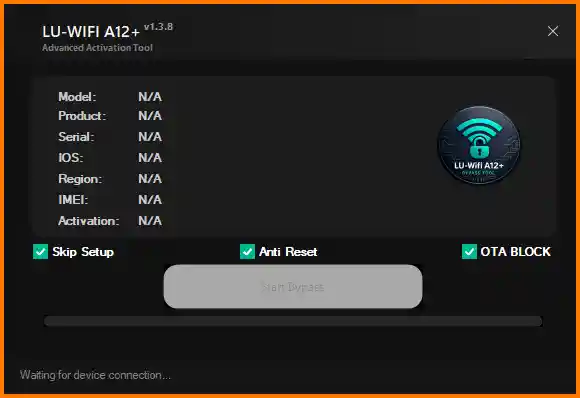
File Information
| Field | Details |
|---|---|
| Tool Name | LU WiFi A12+ Tool |
| Version | V1.3.8 (Latest – 2026) |
| Platform | Windows 7 / 8 / 10 / 11 |
| Supported Devices | iPhone 6s through iPhone XS Max & Newer |
| Supported iOS | iOS 15 – iOS 18+ |
| License | Free – No Activation Required |
Download LU WiFi A12+ Tool V1.3.8
⚠️ Warning: This tool is intended for authorized device repair and servicing only. Always ensure you have legal authorization before attempting to bypass any lock on an Apple device. Download and use at your own risk. For educational and testing purposes only.
Requirements
- A Windows PC or Laptop (Windows 7 / 8 / 10 / 11)
- iTunes or Apple Drivers installed on your PC
- Good-quality USB cable to connect the iPhone or iPad
- Active internet connection (required for activation server emulation)
- Supported iPhone or iPad (check with the built-in Device Support Checker)
How To Use LU WiFi A12+ Tool V1.3.8
- Download the ZIP file from the MediaFire link above and extract it to your PC.
- Open the extracted folder and run the tool EXE as Administrator.
- Connect your iPhone or iPad to the PC via USB cable.
- Use the Device Support Checker inside the tool to verify your device is supported.
- If supported, click the Start Bypass button.
- Wait for the bypass process to complete — do not disconnect the device.
- Once done, the Hello screen should be bypassed and the device will become usable.
⚠️ Important: If the bypass is semi-tethered, avoid performing a hard reset on the device as it may lock again. For A12+ devices, some features like cellular service may remain limited after bypass.
FAQ
What is LU WiFi A12+ Tool?
LU WiFi A12+ Tool is a free Windows iOS bypass utility that uses a network-based method to bypass iCloud Activation Lock and Hello Screen on iPhone and iPad devices. It supports iPhone 6s through newer A12+ models and iOS 15 through iOS 18+.
Is the bypass permanent?
Not always. The bypass may be semi-tethered on some devices and iOS versions — meaning the device may return to Activation Lock after a hard reset. Always use the Device Support Checker and research your specific model and iOS version before starting.
Which devices are supported?
iPhone 6s/6s Plus, 7/7 Plus, 8/8 Plus, X (via Checkm8), and iPhone XR, XS, XS Max and newer A12+ models. Select Checkm8-compatible iPad models and some WiFi iPads are also supported.
Does it fix No Signal after bypass?
Yes. The tool includes a No Signal Fix option for cases where cellular signal is lost after bypassing the Hello Screen — common on MEID models after activation bypass.
Is the tool completely free?
Yes. LU WiFi A12+ Tool requires no account, activation, or payment. Just download, extract, and run as Administrator.
Do I need iTunes installed?
Yes. Apple USB drivers (installed via iTunes or Apple Mobile Device Support) are required for the tool to detect and communicate with the iPhone or iPad over USB.
More Tools ⇒