
Wuxinji (WXJ) Schematic Tool v5.15 is a professional hardware motherboard diagram and schematic reference tool used by mobile and laptop repair technicians worldwide. Instead of performing software operations on devices, this tool provides detailed motherboard diagrams, IC line maps, factory resistance diagrams, non-charging repair guides, no-backlight repair guides, and connector base diagrams — helping technicians visually trace circuits, identify damaged ICs, and locate faulty components on Android phones, iPhones, iPads, MacBooks, and laptops. The latest update (March 20, 2025) adds the Huawei Mate30 RS1 single-layer point map and 5 new repair solutions, bringing the total supported model count to 3,637+. The tool is free to download and use.
Wuxinji Tool Features
- ✅ Full Motherboard Schematic Diagrams (Android, iPhone, iPad, MacBook, Laptop)
- ✅ IC Line Maps – Identify Damaged ICs and Components
- ✅ Factory Resistance Diagrams for Connectors and Components
- ✅ Non-Charging Repair Guides (Step-by-Step)
- ✅ No Backlight / Display Repair Guides
- ✅ High-Definition Motherboard Photos (Layered View)
- ✅ Fine Resistance Component Diagrams (Type A & B)
- ✅ Single-Layer and Multi-Layer Point Maps
- ✅ Search by Model Name or Part Number
- ✅ Zoom In / Out for Detailed Component View
- ✅ 3,637+ Supported Models (Industry-Leading Quantity)
- ✅ Regular Updates with New Device Support
- ✅ Free – No Activation or Account Required
Supported Brands
Android Phones
- ✅ Samsung (Galaxy A, S, Note, Z series)
- ✅ Xiaomi / Redmi / POCO (Mi Series)
- ✅ Huawei / Honor (HW Series)
- ✅ OnePlus (OP Series)
- ✅ Vivo (VI Series)
- ✅ OPPO
- ✅ Motorola / Moto
- ✅ Lenovo
- ✅ Nokia
- ✅ ZTE
- ✅ ASUS
- ✅ Meizu / Meitu
- ✅ Gionee
- ✅ Hisense
- ✅ iTel
- ✅ Coolpad
- ✅ LeTV
- ✅ 8848 Ti Series
- ✅ 360 Cellphone Series
- ✅ Xiaolajiao Series
- ✅ Tianyu Series
- ✅ Nut Series
- ✅ Red Devils
- ✅ Phone Series (7 Plus / 7 Plus Qualcomm)
Apple Devices
- ✅ iPhone (All Major Models)
- ✅ iPad (Air / Pro / Mini Series)
- ✅ MacBook / Mac Motherboards
Laptops
- ✅ General Laptop Motherboard Schematics
What’s New – March 2025
Update — March 20, 2025
[New] HW (Huawei) Series:
      - Mate30 RS1 – Single-Layer Point Map Added
      - Total Supported Models: 3,637 (Industry-leading)

[New] Phone Series:
      - Phone 7 Plus / Phone 7 Plus:
        Factory resistance diagram for connector base
      - Phone 7 Plus / Phone 7 Plus (Qualcomm Version):
        Fine resistance component diagram (Type B)

[New] iPad Air 2 (A1567, 9.7-inch, 4G):
      - Non-charging repair guide
      - High-definition motherboard diagram
      - No backlight repair guide

Total: 5 new repair solutions added in this update
Screenshots
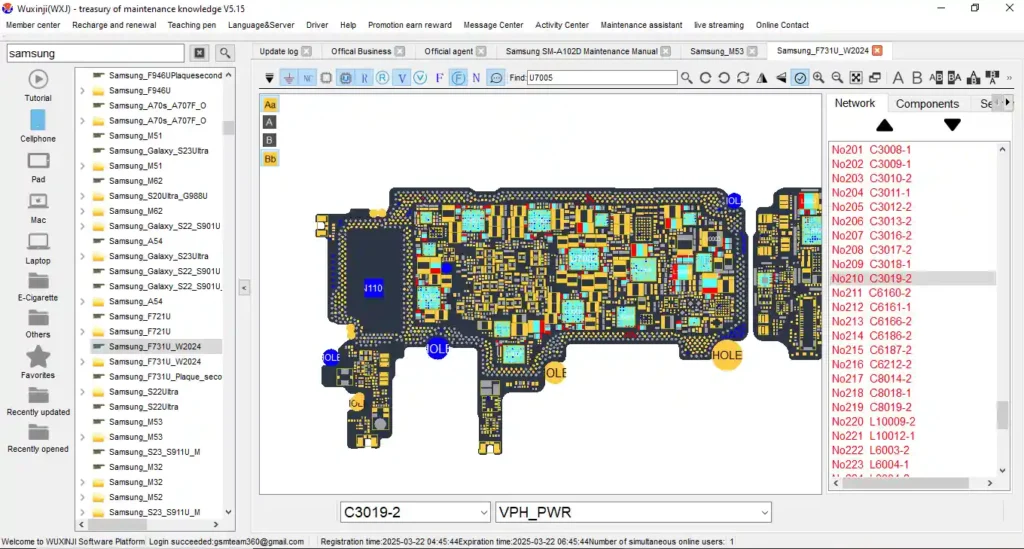

File Information
| Field | Details |
|---|---|
| Tool Name | Wuxinji (WXJ) Schematic Tool |
| Version | v5.15 (Repair5.15) |
| Last Updated | March 20, 2025 |
| File Name | Repair5.15.exe |
| Platform | Windows |
| Supported Models | 3,637+ Devices |
| License | Free – No Activation Required |
Download Wuxinji Schematic Tool v5.15
⚠️ Warning: Download and use at your own risk. This tool is for hardware reference and diagnosis only — it does not connect to or modify any device. For educational and professional repair use only.
Requirements
- A Windows PC or Laptop (Windows XP / 7 / 8 / 10 / 11)
- No installation required — run the EXE directly
- Sufficient free disk space for the database (varies by version)
- Disable Antivirus or Windows Defender if flagged as false positive
How To Use Wuxinji Schematic Tool v5.15
- Download Repair5.15.exe from the MediaFire link above.
- Run the EXE directly — no installation required.
- The tool opens with the main brand/series selection panel.
- Select the brand (e.g., Samsung, Huawei, Xiaomi, iPhone, iPad).
- Browse or search for your device model.
- Select the type of diagram you need — Schematic, PCB Layout, Resistance Diagram, or Repair Guide.
- Use Zoom In / Out to inspect IC lines, component values, and circuit paths in detail.
- Reference the diagram while performing hardware diagnosis or repair on the physical motherboard.
✅ Tip: Use the search bar to quickly find a specific model by name or part number instead of browsing through the full list.
FAQ
What is Wuxinji (WXJ) Schematic Tool?
Wuxinji (WXJ) is a professional hardware motherboard diagram tool used by mobile and laptop repair technicians. It provides schematic diagrams, IC line maps, factory resistance diagrams, non-charging repair guides, and no-backlight repair guides for 3,637+ Android phones, iPhones, iPads, MacBooks, and laptops — allowing technicians to trace circuits and identify faulty components visually.
Is Wuxinji Tool free?
Yes. The tool is completely free — no account, activation, or payment required. Download and run the EXE directly.
Does the tool connect to my phone or laptop?
No. Wuxinji is a reference tool only — it does not connect to, communicate with, or modify any device. It is used alongside physical repair work to provide circuit diagrams and component reference.
How many devices does it support?
The March 2025 update brings total supported models to 3,637+ — making it one of the largest hardware schematic databases available in the mobile repair industry.
What types of diagrams does it include?
The tool includes full motherboard schematics, IC line maps, single-layer and multi-layer point maps, factory resistance diagrams (Type A & B), high-definition motherboard photos, non-charging repair guides, and no-backlight repair guides depending on the device model.
Which Apple devices are supported?
The tool includes schematic diagrams for major iPhone models, iPad Air / Pro / Mini series (including iPad Air 2 non-charging and no-backlight guides added in March 2025), and MacBook motherboard diagrams.
More Tools ⇒