VNboards v1.2.63 is the latest release of the free PCB boardview viewer software developed by the VNboards team and hosted on GitHub. It is designed for laptop, MacBook, and mobile motherboard repair technicians who need to open, view, and analyze PCB boardview files to identify component locations, trace circuit connections, and diagnose hardware faults visually. The tool supports standard boardview formats including .brd, .bv2, and .bvr, and offers a clean reading interface with zoom, layer switching, component highlight, and net trace tools. V1.2.63 adds stronger protection for board data using one-way encrypted hardware identifiers — normal use is not affected and no personal information is collected.
VNboards Features
- ✅ Open and View PCB Boardview Files
- ✅ Support for .brd / .bv2 / .bvr Boardview Formats
- ✅ Component Location Search and Highlight
- ✅ Net Trace – Follow Circuit Connections Visually
- ✅ Layer Switching (Top / Bottom / Both)
- ✅ Zoom In / Out with Mouse Scroll
- ✅ Pin and Component Information Panel
- ✅ Multi-Device Hardware Identification (V1.2.63 – Anti-Bulk-Download Protection)
- ✅ Self-Update System (Update Button Inside the App)
- ✅ Desktop Shortcut Created During Installation
- ✅ Auto-Launch After Installation
- ✅ Free – No Account or Activation Required
Supported File Formats
| Format | Description |
|---|---|
| .brd | Standard PCB Boardview Format |
| .bv2 | BV2 Boardview Format |
| .bvr | BVR Boardview Format |
VNboards is compatible with boardview files from databases like ZXWtool, WuxBoard, and other sources that export or use standard boardview formats.
Screenshots
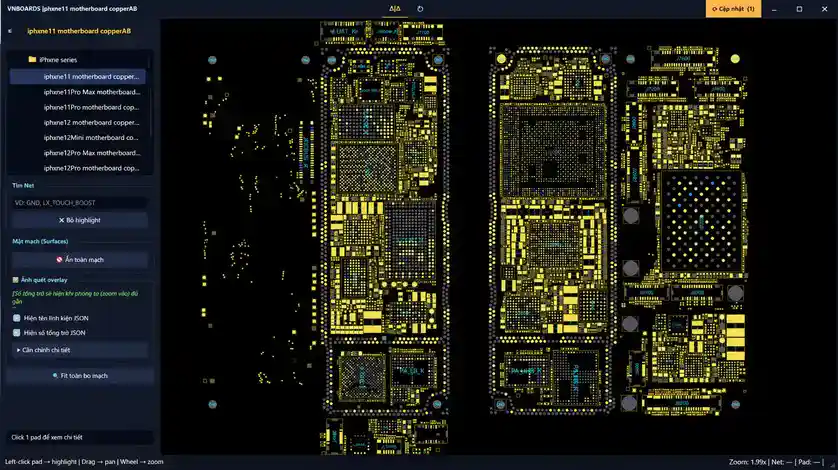
Changelogs – v1.2.63
v1.2.63 — August 26, 2026
[New] Stronger Board Data Protection:
      - Multi-hardware signal device identification added
      - Prevents bulk board data downloads via alternate accounts
      - Uses one-way encrypted hardware identifiers only
      - No personal information collected
      - Normal software use is not affected by this protection
[Enhancement] General stability improvements
File Information
| Field | Details |
|---|---|
| Tool Name | VNboards |
| Version | v1.2.63 (Latest – August 26, 2026) |
| Developer | VNboards Team |
| Source | GitHub (Henrybi9 / conmat-viewer-data) |
| Platform | Windows |
| File to Download | VNboards_Setup.exe (new users) |
| License | Free – No Activation Required |
Download VNboards v1.2.63
✅ Download VNboards_Setup.exe only — ignore VNboards_Update.zip and GitHub source code files. The Update.zip is used internally by the self-update system and does not need to be downloaded manually.
⚠️ Warning: This tool is a hardware reference viewer only — it does not connect to or modify any device. For professional PCB hardware repair and educational use only. Download and use at your own risk.
Requirements
- A Windows PC or Laptop
- Windows 7 / 10 / 11
- Sufficient free disk space for boardview files
- Compatible .brd / .bv2 / .bvr boardview files for your target device
How To Install and Update VNboards
New Users – Fresh Installation
- Go to the GitHub Releases page from the link above.
- Download VNboards_Setup.exe — do not download VNboards_Update.zip or source code files.
- Double-click the downloaded installer.
- Choose your preferred installation location when prompted.
- Complete the installation.
- A Desktop shortcut is created automatically.
- The application opens automatically after installation is complete.
Existing Users – Update to v1.2.63
- Open VNboards from your Desktop shortcut or Start Menu.
- Click the Update button inside the app.
- The self-update system downloads and installs v1.2.63 automatically.
- No need to download the installer or any update file manually.
✅ Tip: Open a boardview file by going to File → Open and selecting your .brd, .bv2, or .bvr file. Use the search bar to find specific components by part number or net name.
FAQ
What is VNboards?
VNboards is a free PCB boardview viewer for laptop, MacBook, and mobile motherboard repair technicians. It opens .brd, .bv2, and .bvr boardview files and lets you visually locate components, trace circuit nets, switch layers, and search by part number — helping diagnose hardware faults without needing physical board access.
Is VNboards completely free?
Yes. VNboards is free to download and use — no account, activation, or payment required. The source is on GitHub at github.com/Henrybi9/conmat-viewer-data.
What is new in v1.2.63?
V1.2.63 adds stronger board data protection using multi-hardware signal device identification — this prevents bulk downloading of board data via alternate accounts. Normal use is completely unaffected and no personal data is collected.
What file formats does VNboards support?
VNboards supports .brd (standard PCB boardview), .bv2, and .bvr boardview formats — the most common formats used by laptop and mobile motherboard boardview databases.
Do I need to download VNboards_Update.zip?
No. VNboards_Update.zip is used internally by the built-in self-update system. If you are a new user, only download VNboards_Setup.exe. If you already have VNboards installed, just click the Update button inside the app.
What is the difference between VNboards and other boardview tools like ZXWtool or OpenBoardView?
VNboards is a viewer focused on clean readability of boardview files from multiple sources. ZXWtool includes its own proprietary board database alongside the viewer. OpenBoardView is open-source and cross-platform. Many repair technicians use VNboards alongside a board database tool (like ZXWtool or WuxBoard) — opening the boardview files exported from those databases in VNboards for easy viewing.
More Tools ⇒