HBG VoLTE & IMS Fixer is a free lightweight Windows ADB tool developed by HBG for enabling VoLTE (Voice over LTE) and IMS (IP Multimedia Subsystem) on Android phones where VoLTE does not appear even though the device hardware and carrier both support it. The tool reads device info including current VoLTE status, then offers two solutions — a one-click ADB-based VoLTE activation or a Shizuku & Pixel IMS app installation for devices where the direct fix does not persist. No root access required. No login, no activation, and no credits needed.
HBG VoLTE & IMS Fixer Features
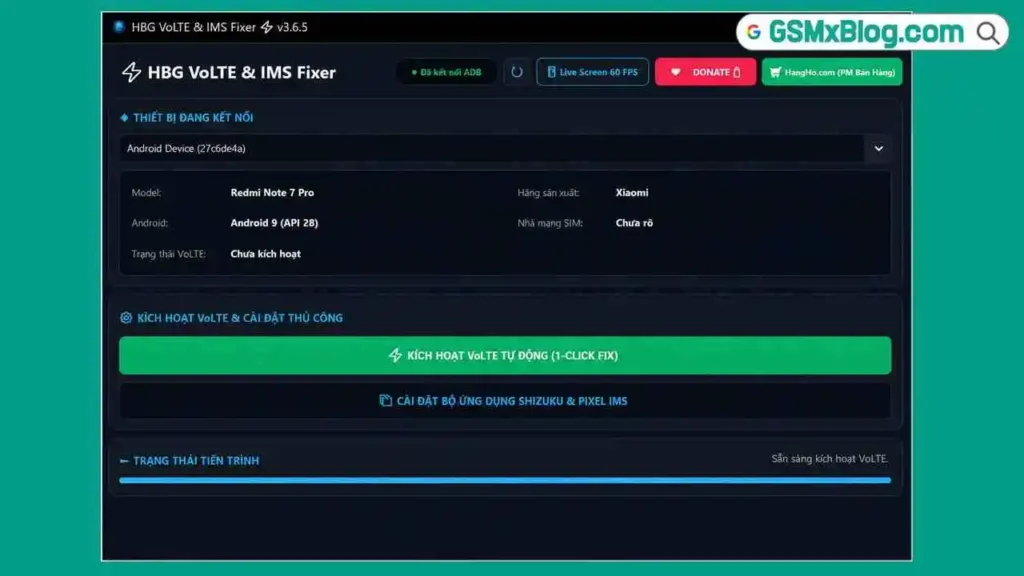
Device Information Reading
- ✅ Auto-Detect Connected Android Device via ADB
- ✅ Read and Display Device Model
- ✅ Read Android Version
- ✅ Read Device Manufacturer
- ✅ Read SIM Carrier Name
- ✅ Display Current VoLTE Status (Active / Not Active)
VoLTE Fix Options
- ✅ One-Click Automatic VoLTE Activation (ADB Command Method)
- ✅ Shizuku & Pixel IMS App Installation (Persistent Method)
Interface & Usability
- ✅ Real-Time Status Message Bar
- ✅ Compact Dark Interface
- ✅ No Root Required
- ✅ No Separate ADB Setup Required (ADB Bundled)
- ✅ No Internet Required for Core Operations
- ✅ Free – No Login or Activation Required
Screenshots
File Information
| Field | Details |
|---|---|
| File Name | HBG_VoLTE_Fixer.rar |
| Developer | HBG |
| Platform | Windows |
| Root Required | No |
| License | Free – No Activation Required |
Download HBG VoLTE & IMS Fixer
Download via OneDrive (Official)
⚠️ Warning: VoLTE activation depends on both the device hardware and SIM carrier supporting VoLTE in your region. If the carrier does not support VoLTE, enabling it on the device will not result in HD voice calls. On some devices, VoLTE may revert after a software update — in that case use the Shizuku & Pixel IMS method for a more persistent fix.
Requirements
| Component | Requirement |
|---|---|
| OS | Windows (any version) |
| Permissions | Run as Administrator |
| USB Debugging | Must be enabled on the Android device |
| Connection | USB data cable |
| ADB | Bundled — no separate ADB setup needed |
| Internet | Not required for core operations |
How To Use HBG VoLTE & IMS Fixer
Step 1 – Enable USB Debugging
- On the Android phone, go to Settings → About Phone.
- Tap Build Number seven times to unlock Developer Options.
- Go to Settings → Developer Options (or Additional Settings → Developer Options).
- Enable USB Debugging.
- Connect the phone to the PC via USB cable.
- Tap Allow on the USB Debugging authorization prompt that appears on the phone.
Step 2 – Check Device Info and VoLTE Status
- Extract the RAR file — no password required.
- Run HBG_VoLTE_Fixer.exe as Administrator.
- The tool auto-detects the connected Android device via ADB.
- Device Model, Android Version, Manufacturer, SIM Carrier, and current VoLTE Status are displayed.
- If VoLTE Status shows as inactive or missing, proceed with one of the two fix options below.
Option 1 – One-Click VoLTE Fix (Most Devices)
- Click the one-click VoLTE fix button in the tool interface.
- The tool sends ADB commands to activate VoLTE on the device automatically.
- Monitor the status bar at the bottom for real-time feedback.
- Wait for the process to complete — the status bar confirms when done.
- The VoLTE status field updates to show VoLTE as active.
Option 2 – Shizuku & Pixel IMS Install (Persistent Fix)
Use this when the one-click fix does not stick or when VoLTE reverts after updates:
- Select the Shizuku & Pixel IMS option in the tool interface.
- Click the install button — the tool pushes the app packages to the device via ADB.
- Follow any on-device prompts if they appear.
- After installation, VoLTE is managed at the IMS service layer for a more persistent result.
⚠️ SmartScreen Warning: Windows SmartScreen may block the EXE — click More Info → Run Anyway. This is a standard false positive for small ADB tools.
After Enabling VoLTE – What To Check
- Go to Settings → SIM & Network (or Mobile Networks).
- Confirm VoLTE or HD Voice toggle is visible and enabled.
- Insert a SIM from a VoLTE-supported carrier if not already inserted.
- Make a test call — VoLTE calls connect faster with noticeably better audio quality.
- Check that the VoLTE icon appears in the status bar during an active call.
FAQ
What is HBG VoLTE & IMS Fixer?
HBG VoLTE & IMS Fixer is a free Windows ADB utility that enables VoLTE and IMS on Android devices where VoLTE does not appear despite hardware and carrier support. It offers a one-click ADB fix and a Shizuku & Pixel IMS installation method — no root required.
Is the tool completely free?
Yes. No activation, login, credits, or payment required. Download, extract, and run as Administrator.
Does it require root access?
No. The tool uses ADB commands to enable VoLTE and install the Shizuku & Pixel IMS apps — root is not needed for either method.
What is the difference between the two fix options?
The one-click fix sends ADB commands that activate VoLTE directly — fast and works on most devices. The Shizuku & Pixel IMS method installs a system-level IMS service package that enables VoLTE more persistently — better for devices where the direct ADB fix reverts after updates.
What are Shizuku and Pixel IMS?
Shizuku is a free app that grants system-level permissions to other apps without full root. Pixel IMS is a modified IMS service package that enables VoLTE on devices with a locked or missing stock IMS configuration. Together they provide a more permanent VoLTE solution on such devices.
VoLTE disappeared after an update — what should I do?
Use Option 2 — the Shizuku & Pixel IMS method. It modifies the IMS service layer more persistently and typically survives software updates better than the direct ADB command fix.
More Tools ⇒