
HaaFedk iCloud Free Tool V14 is the latest update of the popular iOS iCloud bypass and repair tool developed by EmadHaafedk from Egypt. It supports iPhone SE through iPhone X and a wide range of iPad models for iCloud bypass, MDM removal, passcode backup/restore, Hello screen activation, baseband repair, and factory reset via Ramdisk. V14 fixes the device lock issue after bypass with passcode, fixes App Store not working after bypass, adds full iPad jailbreak bypass with serial number change support, and introduces an Activation File extraction feature. The tool is completely free — activate using your Serial Number key.
HaaFedk iCloud Tool Features
iOS 15 / 16 – Hello Screen
- ✅ Read Device Info
- ✅ Activate Jailbreak Hello iOS 15–16 (Requires Serial Number Change)
- ✅ Activate Jailbreak Hello iOS 15 (Requires Jailbreak)
iOS 15 / 16 – Passcode
- ✅ SSH Passcode Backup
- ✅ SSH Passcode Activate
- ✅ Check Device
- ✅ DFU Boot iOS (15.8)
- ✅ DFU Boot iOS (16.0)
General Tools
- ✅ Fix SSH or Mount
- ✅ DFU Factory Reset
- ✅ Ramdisk Factory Reset
- ✅ Fix Blue Screen
- ✅ Device Manager
- ✅ Fix Drivers
- ✅ LibUSBK Drivers Install (DFU Mode)
- ✅ Go to Recovery
iOS 12–14 – Bypass
- ✅ Check Device
- ✅ Bypass GSM or MEID (No Signal)
- ✅ Bypass GSM iOS 12–14
- ✅ Bypass Untethered (No Full)
- ✅ Fix iCloud Notifications
- ✅ Bypass MDM (No Jailbreak Required – All iOS)
- ✅ Fix Banking Apps (Remove Jailbreak)
- ✅ Bypass Broken Baseband
- ✅ Remove Baseband / Restore Baseband
iOS 12–14 – Passcode
- ✅ Patch USB for Passcode
- ✅ Backup Device (Passcode)
- ✅ Activate Device (Backup)
- ✅ Erase iOS 12–14.x
- ✅ Restart Device
- ✅ Fix Battery MEID
- ✅ Erase iOS 14 – A11/A9 Diagnostic Mode
- ✅ Bypass Open Menu (Not FMI Off)
- ✅ Disable OTA Update / Restore
Supported iPhone & iPad Models
iPhone
- ✅ iPhone SE (Requires DCSD Cable)
- ✅ iPhone 6s / 6s Plus (Requires DCSD Cable)
- ✅ iPhone 7 / 7 Plus
- ✅ iPhone 8 / 8 Plus
- ✅ iPhone X
- ✅ iPod Models (Compatible)
iPad (Added in V10.1 – iPad Activate Jailbreak Hello)
- ✅ iPad 5 2017 Wi-Fi (A1822) / 4G (A1823) – Requires DCSD
- ✅ iPad 6 2018 Wi-Fi (A1893) / 4G (A1954)
- ✅ iPad 7 2019 Wi-Fi (A2197) / 4G (A2198, A2200)
- ✅ iPad 8 (iPad11,6 – iPad11,7)
- ✅ iPad 9 (iPad12,1 – iPad12,2)
- ✅ iPad 10 (iPad13,18 – iPad13,19)
- ✅ iPad Air 2 Wi-Fi (A1566) / 4G (A1567) – Requires DCSD
- ✅ iPad Air 4 (iPad13,1 – iPad13,2)
- ✅ iPad Air 5 (iPad13,16 – iPad13,17)
- ✅ iPad Mini 4 Wi-Fi (A1538) / 4G (A1550) – Requires DCSD
- ✅ iPad Mini 6 (iPad14,1 – iPad14,2)
- ✅ iPad Pro 9.7″ (iPad6,3 – iPad6,4)
- ✅ iPad Pro 10.5″ Wi-Fi (A1701) / 4G (A1709, A1852)
- ✅ iPad Pro 11″ (iPad8,1–iPad8,4 / iPad13,4–iPad13,7 / iPad14,3–iPad14,4)
- ✅ iPad Pro 12.9″ 2nd Gen Wi-Fi (A1670) / 4G (A1671, A1821)
- ✅ iPad Pro 12.9″ 5th Gen (iPad13,8–iPad13,10)
- ✅ iPad Pro 12.9″ 6th Gen (iPad14,5–iPad14,6)
- ✅ iPad5,2
What’s New in V14
V14 — 2026
[Fix] Device lock issue after bypass with passcode
[Fix] App Store not working after bypass
[Fix] All known bugs from previous version
[New] Full support for all jailbreak devices
[New] Support for all iOS versions (old and new) on same models
[New] Full iPad jailbreak bypass support
[New] iPad bypass with serial number change support
[New] Device serial edit option for iPad bypass
[New] Extract Activation Files feature (سحب ملفات التفعيل)
[New] Send Activation Files option (to help add more models)

V10.1
[New] iPad Activate Jailbreak Hello feature
[New] Full iPad model support list added (iPad 5 through iPad Pro 12.9" 6th Gen)

V9
[New] Telegram Bot Added – Save backup files easily
[Fix] Improved passcode extraction and file restoration
Screenshots
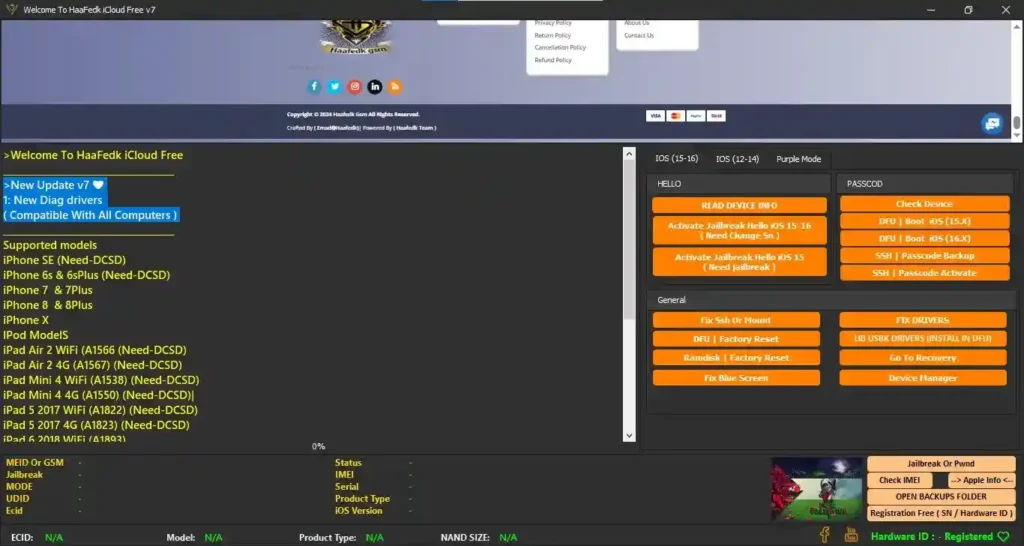
File Information
| Field | Details |
|---|---|
| File Name | Haafedk_Login_Clean_Version_14.rar |
| Version | V14 (Latest – 2026) |
| Developer | EmadHaafedk (Made in Egypt) |
| Platform | Windows |
| Activation | Serial Number (SN) Key |
| License | Free |
Download HaaFedk iCloud Free Tool V14
⚠️ Warning: Download and use at your own risk. This tool is intended for authorized device repair and servicing only. Always ensure you have legal authorization before bypassing any lock on a device. For educational and testing purposes only.
Requirements
- A Windows PC or Laptop
- iTunes installed (for Apple USB drivers)
- DCSD Cable required for select older models (iPhone SE, 6s/6s Plus, some iPad models — listed above)
- Checkra1n or compatible jailbreak tool (for jailbreak-required bypass methods)
- Disable Antivirus or Windows Defender before running the tool
- Active internet connection for Telegram bot backup feature (optional)
How To Install and Use HaaFedk iCloud Free Tool V14
- Download the RAR file from the MediaFire link above.
- Extract the file using WinRAR or 7-Zip to your PC.
- Open the extracted folder and run the setup/installer.
- When the tool opens, enter your Serial Number (SN) Key to activate.
- Once the tool is open, connect your iPhone or iPad via USB.
- Select the correct tab based on your device’s iOS version — iOS 15/16 or iOS 12–14.
- Choose the required function — Bypass, Passcode, Hello activation, or General tools.
- Follow the on-screen instructions and wait for the process to complete.
⚠️ Note: Some models require a DCSD cable instead of a standard USB cable for certain operations. Check the supported models list above to confirm your device’s cable requirement.
FAQ
What is HaaFedk iCloud Free Tool?
HaaFedk iCloud Free Tool is a Windows iOS servicing application developed by EmadHaafedk from Egypt. It supports iCloud bypass, MDM removal, passcode backup/restore, Hello screen activation via jailbreak, baseband repair, and factory reset via Ramdisk for iPhone SE through iPhone X and a wide range of iPad models.
Is the tool completely free?
Yes. The tool is free — activation requires a Serial Number (SN) key which is available from the developer’s community (Telegram group or Facebook page).
What is new in V14?
V14 fixes the device lock issue after passcode bypass, fixes App Store not working after bypass, adds full iPad jailbreak bypass with serial change support, adds full support for all iOS versions on same-generation models, and introduces an Activation File extraction feature to help expand model support.
Which models require a DCSD cable?
iPhone SE, iPhone 6s/6s Plus, iPad Air 2 (A1566/A1567), iPad Mini 4 (A1538/A1550), and iPad 5 2017 (A1822/A1823) all require a DCSD cable. All other supported models work with a standard USB cable.
What is the Activation File extraction feature?
The Extract Activation Files feature (سحب ملفات التفعيل) allows users to pull activation data from their device and optionally send it to the developer via the Send Activation Files option — helping the HaaFedk team add support for additional iPhone and iPad models in future updates.
Does it support iOS 16?
Yes. The iOS 15/16 tab supports Hello screen activation via jailbreak (with serial change) and passcode operations via SSH for iOS 15 and 16 devices.
More Tools ⇒