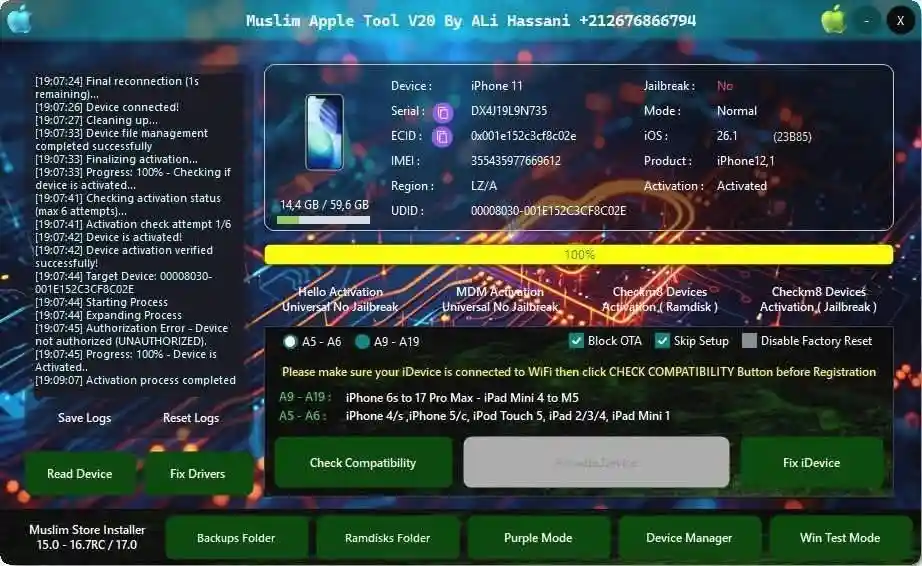
Muslim Apple Tool V20 is a free iOS servicing platform released by Ali Hassani and activated free by RE GURU. It combines Hello Activation bypass, MDM bypass, Checkm8 Ramdisk tools, Checkm8 Jailbreak, Purple Mode operations, and a built-in MagicCFG window for SysCFG read/write — all inside a single Windows application. Unlike most iOS tools that require a dongle or server credits, Muslim Apple Tool V20 activates through a companion Muslim Odin session running in the background, making it completely free. The tool has been personally tested on Windows 11 — every menu opened correctly with no crashes, and the software worked fully offline after the initial launch sequence.
Muslim Apple Tool V20 Features
- ✅ Hello Activation (No Jailbreak Required)
- ✅ MDM Activation Bypass (No Jailbreak Required)
- ✅ Checkm8 Ramdisk Activation
- ✅ Checkm8 Jailbreak Activation
- ✅ Purple Mode Operations
- ✅ Device Manager
- ✅ Backups Folder Access
- ✅ Ramdisks Folder Access
- ✅ Windows Test Mode Toggle
- ✅ Fix Drivers
- ✅ Fix iCloud Login (App Store Method)
- ✅ Built-in MagicCFG Window (SysCFG Read/Write)
- ✅ Copy Serial Number / ECID Button
- ✅ Live Progress Bar and Logs
- ✅ Works Offline After Initial Activation
MagicCFG Functions
The built-in Muslim Magic CFG window provides full Purple Mode SysCFG access:
- ✅ Read SYSCFG
- ✅ Save SYSCFG
- ✅ Write Serial Number
- ✅ Write Model
- ✅ Write Region
- ✅ Write WiFi Data
- ✅ Write MLB
- ✅ Fix Camera (JP Region Fix)
- ✅ Fix FaceTime
- ✅ Unbind WiFi
- ✅ Factory Reset
- ✅ Exit Purple Mode
- ✅ Boot Purple
- ✅ Read DFU Device
- ✅ Connect Serial Port
- ✅ DCSD Cable List
Screenshots

File Information
| Field | Details |
|---|---|
| Tool Name | Muslim Apple Tool V20 |
| Version | V20 (Latest – July 7, 2026) |
| Developed By | Ali Hassani |
| Activated By | RE GURU |
| Platform | Windows (64-bit) |
| License | Free (Requires Muslim Odin Running) |
| RAR Password | gsmyogesh |
| Installer Password | 123456 |
| Muslim Odin Login Email | admin@moadmin.com |
| Muslim Odin Login Password | 1337 |
Download Muslim Apple Tool V20
RAR Password: gsmyogesh | Installer Password: 123456
⚠️ Warning: The download package contains multiple ZIP files — extract each one separately and keep all files in one folder. Muslim Apple Tool V20 will not open without Muslim Odin running in the background. For educational and testing purposes only.
Requirements
- A Windows PC or Laptop (Windows 10 / 11 — 64-bit)
- iTunes or 3uTools installed (for Apple USB drivers)
- Muslim Odin v3.0 or later must be running before opening the tool
- Active internet connection for Muslim Odin login on first launch
- Windows Security exclusion folder (recommended — do not fully disable antivirus; add the extraction folder as an exclusion instead)
How To Install and Activate Muslim Apple Tool V20
Step 1 – Create a Windows Security Exclusion Folder
- Open Windows Security → Virus & threat protection → Manage settings.
- Under Exclusions, click Add or remove exclusions.
- Add the folder where you will extract all files as an exclusion.
- Extract all downloaded ZIP files into this excluded folder.
✅ Tip: Do not fully disable Windows Defender — adding the extraction folder as an exclusion is safer and works just as well.
Step 2 – Install Muslim Apple Tool V20
- Extract installer_Muslim_Apple_Tool_V20_By_Ali_Hassani.zip using password 123456.
- Run the installer EXE file.
- If Windows SmartScreen appears, click More info → Run anyway.
- Complete the installation following the on-screen steps.
Step 3 – Generate SHA256 Hash
- Open Command Prompt as Administrator.
- Open the Command text file included in the package.
- Copy the
certutil -hashfilecommand from the text file and paste it into Command Prompt. - Drag the Muslim Apple Tool Desktop shortcut into Command Prompt and press Enter.
- Repeat using the actual .exe file (right-click the shortcut → Open file location → drag the EXE).
Step 4 – Run RE GURU
- Extract RE GURU.zip into the same exclusion folder.
- Run the RE GURU application.
- Click Allow access if Windows Security asks.
- Keep RE GURU running in the background — do not close it.
Step 5 – Activate via Muslim Odin
- Extract and open Muslim Odin v3.0.
- Enter login credentials:
- Email: admin@moadmin.com
- Password: 1337
- Wait until Muslim Odin completes the computer check and shows “Normal use was successfully tested.”
- Keep Muslim Odin running — do not close it.
Step 6 – Open Muslim Apple Tool V20
- With Muslim Odin still running, open the Muslim Apple Tool V20 Desktop shortcut.
- The tool will now open without any activation error.
- Connect your iPhone or iPad via USB to start using the features.
⚠️ Important: If you open Muslim Apple Tool before Muslim Odin finishes loading, you will see an activation error. Always wait for Muslim Odin to show the success message first.
Device Information Displayed
When a supported Apple device is connected, the home screen shows:
| Field | Details |
|---|---|
| Device | iPhone / iPad model name |
| Serial Number | Device serial number (with Copy button) |
| ECID | Unique chip ID (with Copy button) |
| IMEI | Device IMEI number |
| Region | Device region code |
| UDID | Unique Device Identifier |
| Jailbreak Status | Jailbroken / Not Jailbroken |
| Mode | Current device mode |
| iOS Version | Installed iOS version |
| Activation Status | Activated / Not Activated |
Without a connected device, all fields show NA — this is normal and expected.
Known Issues
- Muslim Odin must stay open: If you close Muslim Odin while using Muslim Apple Tool V20, the tool may lose activation. Keep both windows running during your work session.
- SHA256 Hash Step: The Command Prompt hash generation step during setup may confuse first-time users. Follow the steps exactly — drag the shortcut first, then the EXE file separately.
- Windows Defender Deletions: Windows Defender may delete files during extraction if no exclusion folder is set. Create the exclusion folder before extracting — not after.
- Multiple ZIP Files: The download package contains several ZIP files, not a single installer. Extract each one separately and keep all output files in the same folder.
- No Device Available for Full Testing: The source review was conducted without a physical iPhone connected. All function menus opened correctly but actual device operations were not tested.
FAQ
What is Muslim Apple Tool V20?
Muslim Apple Tool V20 is a free iOS service tool developed by Ali Hassani and activated for free by RE GURU. It supports Hello Activation bypass, MDM bypass, Checkm8 Ramdisk and Jailbreak tools, Purple Mode, and a built-in MagicCFG window for SysCFG read/write — all without a dongle or server credits.
Is the tool completely free?
Yes. No credits, dongle, or paid activation are required. The tool activates through Muslim Odin running in the background using the free login credentials provided above.
Why does the tool show an activation error?
Muslim Apple Tool V20 requires Muslim Odin to be running and fully loaded before it can open. If you see an activation error, make sure Muslim Odin has completed its computer check and shows the success message before launching the tool.
Does it work offline?
Yes — after the initial login through Muslim Odin (which requires internet once), the tool works fully offline during operation.
What is the difference between Hello Activation and Checkm8 Activation?
Hello Activation bypass works without jailbreak on supported devices and is useful for bypassing the Hello setup screen. Checkm8 Ramdisk Activation uses the hardware-level Checkm8 exploit for deeper access and is required for older A-series chip devices within the Checkm8 exploit range.
Why do I need to add a Windows Security exclusion folder?
Windows Defender may detect and delete certain tool files during extraction due to false positive detection of GSM/iOS repair components. Adding the extraction folder as an exclusion prevents this without fully disabling Windows protection.
More Tools ⇒
- Muslim Odin v5.0 Free Download
- USBLiter8 A12-A13 MagicCFG Free Download
- SamFw FRP Tool V5.5.1 Free Download