Xiaomi DIAG Mode Tool v2.1 is a free lightweight Windows utility developed by GSMYOGESH for enabling Qualcomm Diagnostic (DIAG) mode on Xiaomi and Redmi devices via ADB. Once DIAG mode is active, a COM port appears in Windows Device Manager — which is required by tools like DTPro, NCK, and other IMEI repair utilities to perform QCN read/write, IMEI repair, and other Diag-based operations. The tool handles the full process automatically — detecting the device, installing the diagnostic APK (automatically or with manual guidance), starting DIAG mode, and confirming driver detection. No login, no activation, and no credits required. Tested 100% working on August 16, 2026.
Xiaomi DIAG Mode Tool Features
- ✅ Automatic Xiaomi / Redmi Device Detection via ADB
- ✅ Reads Device Model, Brand, Android Version, MIUI / HyperOS Info
- ✅ ADB Connection Check Before Starting
- ✅ Automatic Diagnostic APK Installation (if not already installed)
- ✅ Manual APK Installation Fallback (copies APK to Download folder)
- ✅ Manual Installation Verification Step
- ✅ One-Click DIAG Mode Enable
- ✅ DIAG Driver Auto-Detection After Mode Activation
- ✅ Progress Status Display (Checking → Installing → Starting DIAG → Detecting → Success)
- ✅ Live Progress Bar
- ✅ Dark Interface – Clean and Simple
- ✅ Free – No Login or Activation Required
Screenshots
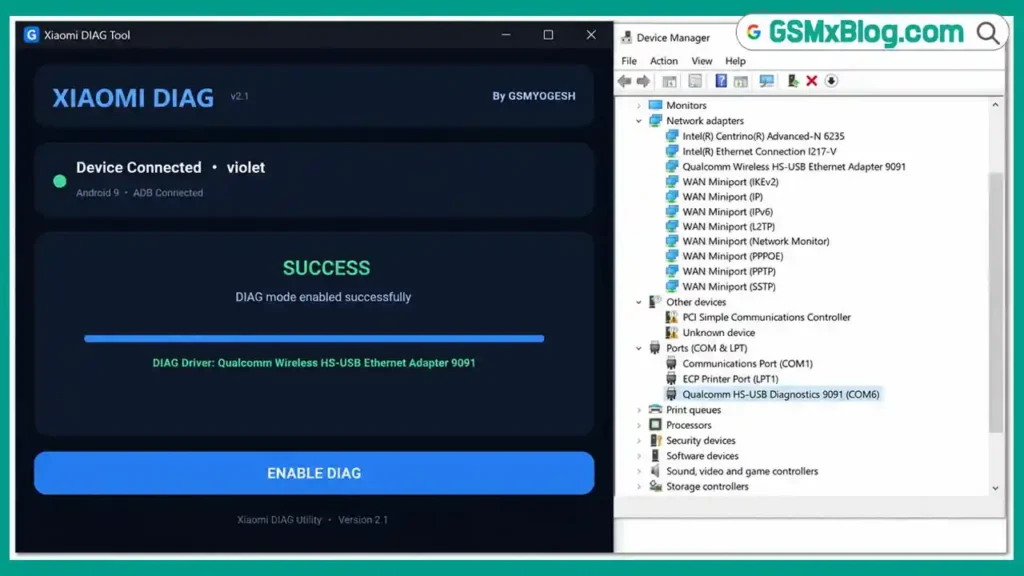
File Information
| Field | Details |
|---|---|
| Tool Name | Xiaomi DIAG Mode Tool |
| Version | v2.1 (Latest – August 16, 2026) |
| Developer | GSMYOGESH |
| Platform | Windows |
| Supported Devices | Xiaomi / Redmi (ADB-connected) |
| License | Free – No Activation Required |
Download Xiaomi DIAG Mode Tool v2.1
Download via OneDrive (Official)
⚠️ Warning: Download and use at your own risk. Enabling DIAG mode on a Xiaomi device changes its USB communication state. Always use DIAG mode operations with compatible tools. For educational and testing purposes only.
Requirements
- A Windows PC or Laptop
- Windows 7 / 10 / 11
- ADB (Android Debug Bridge) installed on your PC
- Qualcomm USB / DIAG Driver installed (for DIAG port detection after activation)
- Xiaomi / Redmi device with USB Debugging enabled (ADB must be active)
- USB cable to connect the device
How To Use Xiaomi DIAG Mode Tool v2.1
- Download the file from the OneDrive link above and extract it to your PC.
- Make sure USB Debugging is enabled on your Xiaomi phone (Settings → Developer Options → USB Debugging).
- Connect your Xiaomi phone to the PC via USB cable.
- Open Xiaomi DIAG Mode Tool v2.1 — no installation required, just run the EXE.
- The tool will automatically detect the connected Xiaomi device and display the model and Android version.
- Click ENABLE DIAG to begin the process.
- If the diagnostic APK is already installed, the tool continues automatically.
- If not installed, the tool will attempt automatic APK installation.
- If automatic installation fails, the tool copies the APK to Internal Storage → Download and asks you to install it manually from the device.
- After manual installation, click CONTINUE — the tool verifies the installation.
- Once verified, the tool starts DIAG Mode on the device.
- The tool then waits for the Windows DIAG driver to appear in Device Manager.
- When detected, the tool shows Success — the Qualcomm Diagnostic COM port is now active and ready for IMEI repair tools.
✅ After DIAG Mode is active: Open your preferred IMEI repair tool (DTPro, NCK, MRT, etc.), select the detected COM port, and perform your IMEI repair or QCN read/write operation.
FAQ
What is Xiaomi DIAG Mode Tool?
Xiaomi DIAG Mode Tool v2.1 is a free Windows ADB utility by GSMYOGESH that enables Qualcomm Diagnostic (DIAG) mode on Xiaomi and Redmi devices. Once enabled, a Qualcomm Diagnostic COM port appears in Windows Device Manager — required by IMEI repair tools for QCN read/write, IMEI repair, and other diagnostic operations.
Why is DIAG mode needed?
DIAG mode exposes the Qualcomm Diagnostic interface (COM port) on the device’s USB connection. Most Xiaomi IMEI repair tools like DTPro Qualcomm Module, NCK, and MRT communicate through this COM port to perform IMEI read, write, and QCN backup/restore operations.
Does the tool work on all Xiaomi devices?
The tool is designed for Xiaomi and Redmi devices. Compatibility depends on the MIUI / HyperOS version and whether the device allows diagnostic APK installation via ADB. Newer HyperOS security patches may restrict APK sideloading — in those cases, manual installation may not be possible.
What if the automatic APK installation fails?
The tool falls back to a manual method — it copies the diagnostic APK to your phone’s Internal Storage → Download folder and asks you to install it manually from the file manager on the device. After installation, click Continue in the tool.
Is the tool completely free?
Yes. The tool is completely free — no account, activation code, credits, or payment required.
What do I do after DIAG mode is enabled?
Once the Qualcomm Diagnostic COM port appears in Windows Device Manager (shown as success in the tool), open your IMEI repair tool, select the COM port, and proceed with IMEI repair or QCN read/write. DIAG mode remains active until you reboot or disconnect the device.
More Tools ⇒