
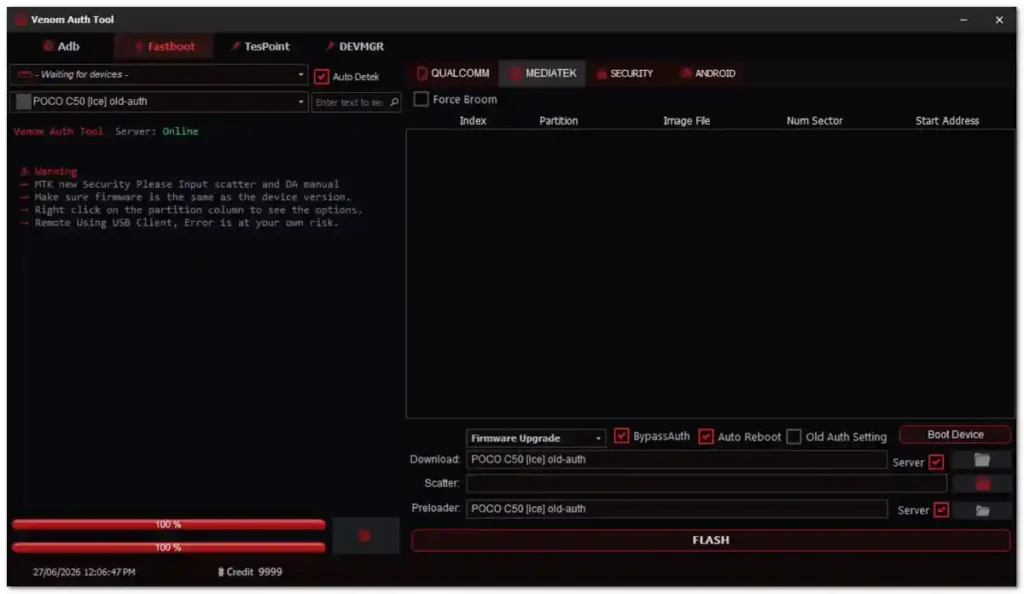
Venom Auth Tool is a Windows-based Android repair utility designed specifically for Xiaomi and POCO devices on both Qualcomm and MediaTek chipsets. It brings together essential repair functions including MiCloud removal, FRP bypass, EDL mode reboot, instant bootloader unlock, Write Engineering Preloader, Force BROM, and ADB/Fastboot tools — all inside a clean tabbed interface with a live log window. The tool uses a free account and credit-based system — account registration and download are completely free via the official venomauthtool.com website, but most device operations require credits. The Reboot to EDL function has been personally tested and confirmed working on a Redmi 4X, successfully entering Qualcomm 9008 mode.
Venom Auth Tool Features
Qualcomm Functions
- ✅ Reboot Fastboot to EDL (Qualcomm 9008 Mode)
- ✅ Instant Bootloader Unlock
- ✅ Force BROM Mode
- ✅ Auto Device Detection
MediaTek Functions
- ✅ Write Engineering Preloader
- ✅ Force BROM Mode
- ✅ MediaTek Android Functions
Android & Security Functions
- ✅ Remove FRP
- ✅ Erase FRP and Userdata
- ✅ Remove MiCloud++
- ✅ Security Tab Functions
ADB & Fastboot Tools
- ✅ ADB Support
- ✅ Fastboot Support
- ✅ Device Manager Shortcut
- ✅ TestPoint Access Button
- ✅ Live Operation Log Window
Supported Devices
- ✅ Xiaomi Devices (Multiple Models – Qualcomm & MediaTek)
- ✅ POCO Devices (Multiple Models)
Screenshots
File Information
| Field | Details |
|---|---|
| File Name | Venom_Auth_Tool_Free_Version.rar |
| File Size | 49 MB |
| Developer | Venom Auth Tool Team |
| Supported OS | Windows 7 / 10 / 11 (PC) |
| Chipset Support | Qualcomm, MediaTek |
| Activation | Free Account + Credit System |
| Registration | venomauthtool.com |
Download Venom Auth Tool
Requirements
| Component | Requirement |
|---|---|
| OS | Windows 7 / 10 / 11 |
| Processor | Intel or AMD Dual-Core |
| RAM | 2 GB minimum |
| Storage | Sufficient free space |
| USB Port | USB 2.0 or 3.0 |
| Internet | Required for login and server operations |
- Qualcomm USB Driver installed for Qualcomm Xiaomi devices
- MTK USB Driver installed for MediaTek Xiaomi devices
- Disable Antivirus or Windows Defender before running the launcher (commonly flagged as false positive)
- Registered account at venomauthtool.com — in-app registration is not available
How To Install and Use Venom Auth Tool
- Download the RAR file from any link above and extract it using WinRAR or 7-Zip.
- Open the extracted folder and locate Launcher.exe.
- Right-click Launcher.exe and select Run as Administrator.
- The login window will open — enter your registered username and password from venomauthtool.com.
- Connect your Xiaomi or POCO device via USB cable.
- Select the correct chipset tab — Qualcomm or MediaTek.
- Choose the required operation and click the function button.
- Monitor the live log window to track the operation in real time.
- Wait for the success message before disconnecting the device.
⚠️ Important: Register your account at venomauthtool.com before launching the tool — in-app registration is not supported. Disable antivirus during launch to avoid false positive interruptions. Use a dedicated repair PC for best results.
FAQ
What is Venom Auth Tool?
Venom Auth Tool is a free Windows utility for Xiaomi and POCO device repair on Qualcomm and MediaTek chipsets. It supports MiCloud removal, FRP bypass, EDL mode reboot, bootloader unlock, Force BROM, Write Engineering Preloader, and ADB/Fastboot operations from a single tabbed interface.
Is Venom Auth Tool completely free?
Account registration and the tool download are free. Most device operations require credits — add credits through the official venomauthtool.com website. The tool does not currently show clear in-app instructions for purchasing credits, so check the official website for that information.
Is the Reboot to EDL function confirmed working?
Yes. The Reboot Fastboot to EDL function was tested on a Redmi 4X and successfully entered Qualcomm 9008 EDL mode — confirmed through Windows Device Manager.
Can I register inside the tool?
No. Registration is only available on the official website at venomauthtool.com. Once your account is created, log in through the tool’s login window.
What USB drivers do I need?
For Qualcomm-based Xiaomi devices, install the Qualcomm USB Driver (QDLoader 9008). For MediaTek Xiaomi devices, install the MTK USB Driver. Both are available in the Drivers section at getgsmtips.com.
Why does antivirus flag the tool?
Launcher-based GSM tools commonly trigger antivirus false positives due to server authentication components. Temporarily disable antivirus only during the launch process and use the tool on a dedicated repair workstation.
More Tools ⇒