KG Killer V2.2 is a free Windows-based Samsung and Android servicing tool focused on Knox Guard (KG) lock removal, FRP bypass, MDM removal, IT Admin bypass, and Vivo FRP reset — all through ADB mode. It covers Samsung Android 13, 14, and 15 KG methods, Vivo FRP Android 15 (three methods), IT Admin removal for Xiaomi HyperOS, Vivo, Tecno/Infinix/Itel, and a full set of QR code bypass and utility tools. The tool requires no paid login — enter any username and password on the login screen to open it. Tested and confirmed working in April 2026.
KG Killer V2.2 Features
General Functions
- ✅ ADB Read Info
- ✅ Live Screen (ADB)
- ✅ Install Samsung Driver
- ✅ Check KG Status (ADB)
- ✅ Samsung PayJoy Remove (New)
- ✅ Disable Google Framework APK
- ✅ FRP Universal (ADB)
- ✅ Samsung Knox Disable
Samsung – KG / ADB
- ✅ KG Android 15 Beta (APK Method)
- ✅ KG Android 14 – New Method 1
- ✅ KG Android 14 – New Method 2
- ✅ KG Android 14 – New Method 3
- ✅ KG Android 14 (All Patch)
- ✅ Set to KG Active 01 (IMEI)
- ✅ KG Android 13 (New Patch)
- ✅ KG Android 13 (03-24)
Samsung – Tools
- ✅ App Install Fix (Play Store)
- ✅ Service Provider Update Fix
- ✅ Samsung Account Remove (ADB)
Vivo
- ✅ Vivo FRP Android 15 (ADB) – Method 1
- ✅ Vivo FRP Android 15 (ADB) – Method 2
- ✅ Vivo FRP Android 15 (ADB) – Method 3
IT Admin
- ✅ IT Admin Android 15 (OG)
- ✅ IT Admin Android 15
- ✅ IT Admin Universal
- ✅ IT Admin Hyper OS (Android 15)
- ✅ IT Admin (Hyper OS)
- ✅ Redmi Android 15 Auto Restart Fix
- ✅ IT Admin Vivo (New Security)
- ✅ IT Admin (Tecno / Infinix / Itel)
MDM
- ✅ Tecno MDM (ADB)
Tools
- ✅ Samsung Flash Tool
- ✅ SIM Unlock (Pixel)
- ✅ Disable Factory Reset – Method 1 & 2
- ✅ Disable OTA Updates / Enable OTA Updates
- ✅ Install Samsung Driver
- ✅ Developer Option Hide
QR Codes
- ✅ ADB Enable QR Android 14 – Method 1 & 2
- ✅ ADB Enable QR Android 13
- ✅ Hyper OS QR 1 & 2
- ✅ IT Admin Universal QR 1 & 2
Screenshots
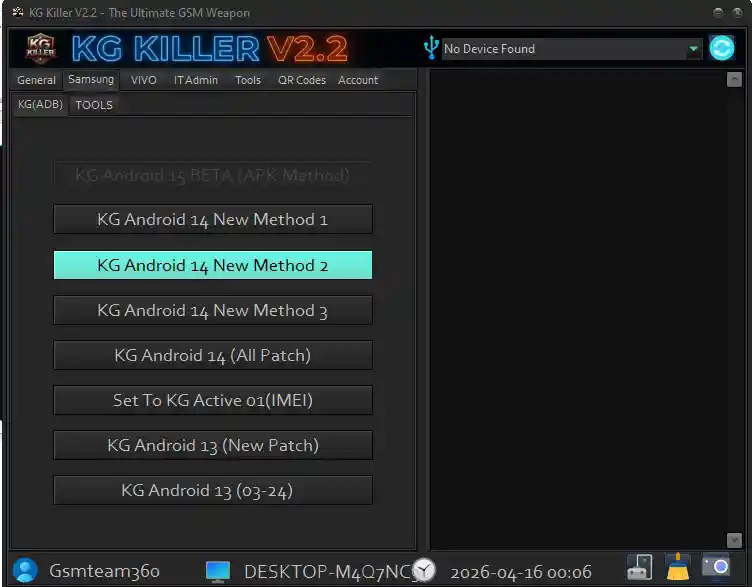


File Information
| Field | Details |
|---|---|
| Tool Name | KG Killer Tool |
| Version | V2.2 (Latest – April 2026) |
| Platform | Windows |
| Login Required | No – Enter Any Username & Password |
| License | Free |
Download KG Killer V2.2
⚠️ Warning: Download and use at your own risk. Always back up your device data before performing any KG or MDM removal operation. For educational and testing purposes only.
Requirements
- A Windows PC or Laptop
- Windows 7 / 10 / 11 (32-bit or 64-bit)
- Samsung USB Drivers installed on your PC
- USB Debugging enabled on the Android device
- Disable Antivirus or Windows Defender before running the tool
How To Install and Use KG Killer V2.2
- Download the file from any link above and extract it to your PC.
- Disable your antivirus before running the tool.
- Run the EXE file as Administrator (right-click → Run as Admin).
- Click the Start Button Classic inside the tool.
- A login screen will appear — enter any username and password (no real credentials needed).
- The main tool interface will open.
- Enable USB Debugging on your Samsung or Android device (Settings → Developer Options → USB Debugging).
- Connect your device via USB cable.
- Select the required function — KG Remove, FRP, IT Admin, MDM, or Tools tab.
- Press the Start button and wait for the process to complete.
⚠️ Important: The login screen accepts any username and password — do not worry about entering real credentials. Just type anything and click login to proceed.
FAQ
What is KG Killer V2.2?
KG Killer V2.2 is a free Windows Samsung service tool focused on Knox Guard (KG) lock removal via ADB for Android 13, 14, and 15 devices. It also covers Vivo FRP Android 15 (three methods), IT Admin removal for Xiaomi HyperOS/Vivo/Tecno/Infinix/Itel, MDM removal, and QR code ADB bypass tools.
Is KG Killer V2.2 completely free?
Yes. The tool is completely free — no paid account, credits, or activation code required. The login screen accepts any username and password.
What login details do I need to enter?
No real login details are needed. Type any username and password on the login screen and click login — the tool will open regardless of what you enter.
Which Samsung Android versions are supported for KG removal?
KG Killer V2.2 supports Samsung Android 13 (two methods), Android 14 (four methods including All Patch), and Android 15 Beta (APK method).
Does it support Xiaomi HyperOS IT Admin removal?
Yes. The IT Admin tab includes dedicated methods for HyperOS Android 15, standard HyperOS, and a Redmi Android 15 Auto Restart Fix alongside support for Vivo New Security and Tecno/Infinix/Itel devices.
Does the tool need USB Debugging?
Yes. All functions in KG Killer V2.2 operate through ADB mode, so USB Debugging must be enabled on the Android device before connecting to the tool.
More Tools ⇒