MTK PRO Tool V54 is a powerful Windows-based Android servicing utility designed primarily for MediaTek devices but expanded to cover Samsung Exynos, Redmi, Vivo, Oppo, Motorola, TCL, Infinix, Tecno, Nokia, Lenovo, and more. It covers FRP removal, firmware flashing, factory reset, bootloader unlock, IMEI repair, Samsung MTK/Exynos functions, iPhone iOS tools, MTP Browser, ADB commands, Diag operations, and a Firmware Extractor — all in one tabbed interface. V54 adds a new Exynos loader, Android 15 and 16 support, updated FRP methods, Redmi EDL test point support, improved KG/Knox bypass, and over 100 internal fixes. MTK PRO Tool V54 is an offline module — Muslim Odin must be installed and running first as it is not a standalone application.
MTK PRO Tool V54 Features
General Functions
- ✅ Remove FRP Lock
- ✅ Factory Reset
- ✅ Read Device Information
- ✅ Flash Firmware
- ✅ Backup & Restore
- ✅ Unlock Bootloader / Relock Bootloader
- ✅ Format User Data
- ✅ MediaTek BROM Operations
- ✅ Samsung MTK Support
- ✅ Exynos Loader Support
- ✅ Android 15 & Android 16 Compatibility
- ✅ KG / MDM / Knox Bypass Improvements
- ✅ Redmi EDL Test Point Support
- ✅ Faster Device Detection
- ✅ Improved Stability and Performance
MediaTek (MTK) Functions
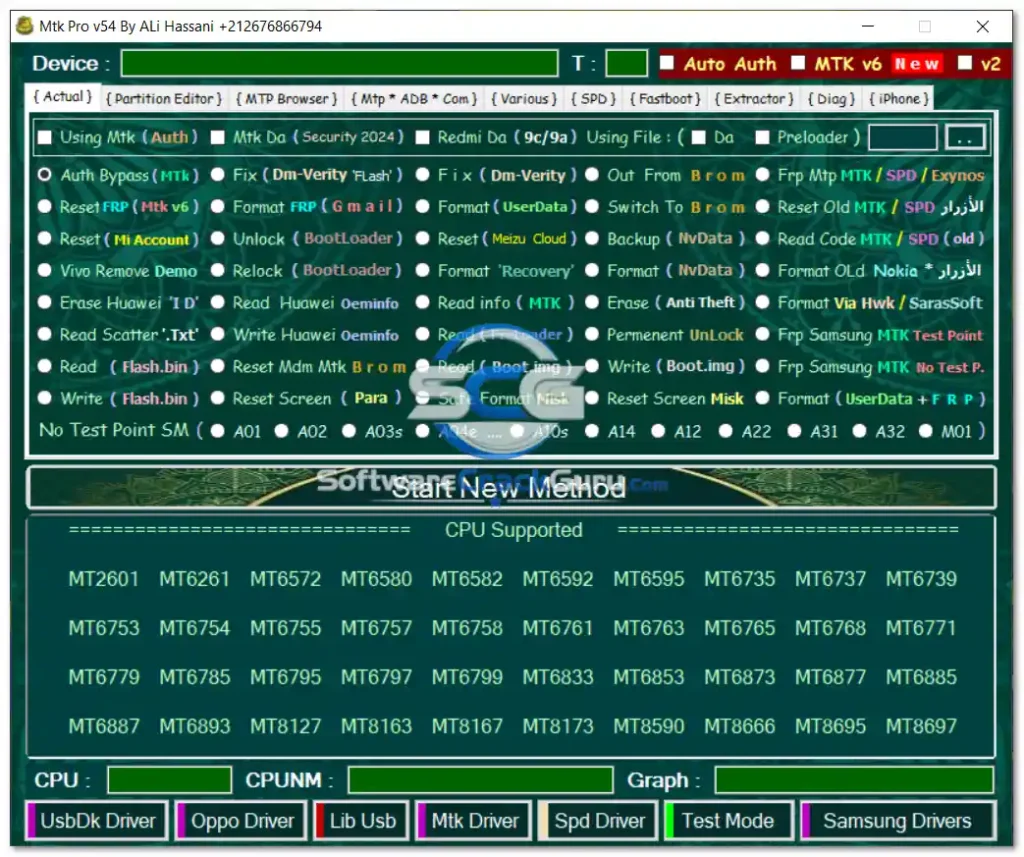
- ✅ 0-Auth Bypass / Auto Auth / MTK V6 Security
- ✅ Reset FRP / Reset Mi Account / Erase Huawei ID
- ✅ Vivo Demo Removal / Reset Meizu Cloud
- ✅ Read Scatter File / Mtx DA Security 2024
- ✅ Fix DM-Verity / Format FRP / Format Recovery
- ✅ Unlock Bootloader / Relock Bootloader / Permanent Unlock
- ✅ Read & Write Huawei OEMINFO
- ✅ Redmi DA Support / Format UserData / Format UserData + FRP
- ✅ Switch BROM Mode / Exit BROM Mode
- ✅ Backup NvData / Format NvData
- ✅ Read Device Information / Erase Anti-Theft
- ✅ Read Preloader / Read & Write Flash.bin / Read & Write Boot.img
- ✅ Reset MDM / Reset Screen Lock / Safe Format
- ✅ Supports MT2601 through MT8697 chipsets
Samsung & Exynos Functions
- ✅ FRP via MTP (MTK, SPD, Exynos)
- ✅ Samsung MTK Test Point FRP / No Test Point FRP
- ✅ Read Download Mode Info / Read MTP Info
- ✅ MTP FRP for Samsung and Huawei
- ✅ Android 13 MTP FRP / USA FRP MTP 2024
- ✅ Reset FRP (New & Old Methods)
- ✅ Delete Samsung Account / Delete Huawei Account
- ✅ Install Arabic Language Packages
- ✅ Anti Relock / Tab A7 & Tab A9+ Format
- ✅ Reset Knox / Reset KG / Reset MDM / New MDM Kill
- ✅ Remove Enterprise Apps / Enable Mobile Data
- ✅ Fix Tablet Boot Loop / Factory Reset / Repair Smart Switch
- ✅ Change CSC / Change Serial / Fix MTP Mode / Download Mode Reboot
iPhone & iOS Functions
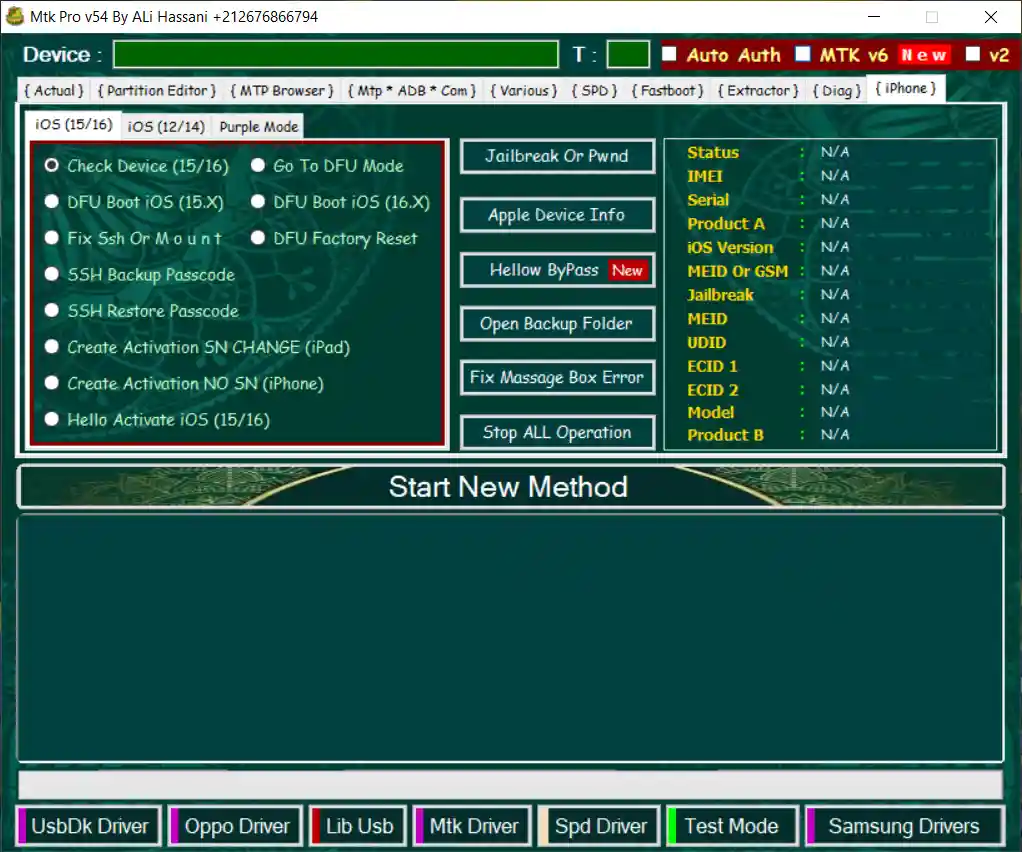
- ✅ Supports iOS 12 through iOS 16
- ✅ Purple Mode / Jailbreak & Pwnd Options
- ✅ Device Information / DFU Boot / Go to DFU
- ✅ Factory Reset / SSH Backup & Restore
- ✅ Hello Bypass / Activation Creation / MDM Bypass
- ✅ MEID and GSM Bypass
- ✅ Broken Baseband Fix / Baseband Remove & Restore
- ✅ Purple Mode Boot / Ramdisk Full Reset
- ✅ Read Owner Information
MTP Browser
- ✅ Two MTP Connection Methods
- ✅ Open YouTube / Google Maps / Samsung URL Launcher
- ✅ Invisible Installer / Visible Installer
- ✅ Open File Manager / S7 & S8 Launcher
- ✅ Alliance Shield Launcher / Hidden Settings
- ✅ Huawei App Gallery / Smart Switch / Custom URL Launcher
ADB Commands
- ✅ Enable Diag / Read Device Info / Stop System Updates
- ✅ Reset KG Lock / Mi Anti Relock
- ✅ Install Arabic Language / Install Keyboard / Install One UI Files
- ✅ Reboot Bootloader / Fix Realme Wireless
- ✅ Send ADB / AT / Hex Commands
- ✅ Recovery Reboot / QR Code Bypass / Reset KaiOS / Network Unlock
- ✅ Enable Unknown APK Installation
Diag Operations
- ✅ Read Information / Factory Reset / Format UserData / Format FRP
- ✅ SIM Unlock / SIM Relock
- ✅ Enter Diag Mode / Exit Diag Mode / Power Off Device
Firmware Extractor
- ✅ Extract KDZ & DZ / OFP & OZIP / LZ4 / APP / IMG / OPS
- ✅ Extract OnePlus Files / OEMINFO / TAR & MD5
- ✅ Extract Payload.bin / SIN & FTF / NB0 / PAC
- ✅ Create Samsung FRP Firmware
Extra Brand Modules
- ✅ Vivo Fastboot Tools / Vivo Sideload Tools / Vivo Format / Vivo Recovery Wipe
- ✅ Xiaomi Sideload / Xiaomi Sideload Format
- ✅ LG MTP Tools / LG Driver Launcher
- ✅ SPD UserData & FRP Format / SPD Device List
Supported Brands
- ✅ Samsung, Xiaomi, Redmi, POCO
- ✅ Vivo, Oppo, Realme, Motorola
- ✅ Tecno, Infinix, Itel, Nokia
- ✅ Lenovo, TCL, Huawei (Selected Models)
- ✅ Other MediaTek-based devices
Screenshots
What’s New in V54
V54 — July 2026
[New] Exynos Loader Added
[New] Android 15 & Android 16 Support
[New] Updated FRP Removal Methods
[New] Redmi EDL Test Point Support
[New] Updated Virus Cleaner
[Enhancement] Better Samsung MTK Compatibility
[Enhancement] Improved KG and Knox Bypass
[Fix] 100+ internal fixes and optimizations
File Information
| Field | Details |
|---|---|
| Tool Name | MTK PRO Tool |
| Version | V54 (Latest – July 16, 2026) |
| Platform | Windows 7 / 8 / 10 / 11 (32-bit & 64-bit) |
| Category | Android Service Tool (Offline Module) |
| Dependency | Muslim Odin must be installed and running |
| License | Free |
Download MTK PRO Tool V54
⚠️ Important: MTK PRO Tool V54 is an offline module — it requires Muslim Odin to be installed and running first. It is not a standalone application. Download and install Muslim Odin before attempting to open this tool.
⚠️ Warning: Download and use at your own risk. Always back up device data before performing any flash, format, or repair operation. For educational and testing purposes only.
Requirements
- A Windows PC or Laptop
- Windows 7 / 8 / 10 / 11 (32-bit & 64-bit)
- Microsoft .NET Framework installed
- MTK / Samsung / Qualcomm USB Drivers installed
- Muslim Odin installed and running (required dependency)
- Minimum 2 GB RAM / 500 MB free disk space
- USB data cable to connect your Android device
- Disable Antivirus or Windows Defender before running
How To Install and Use MTK PRO Tool V54
- Install Muslim Odin first — MTK PRO Tool V54 is an offline module that requires Muslim Odin running in the background. Download and set up Muslim Odin before proceeding.
- Download MTK PRO Tool V54 from any link above and extract the ZIP file.
- Install all required USB drivers for your device brand.
- Run the tool as Administrator (right-click → Run as Admin).
- Connect your supported Android device via USB cable.
- Select the required function from the relevant tab — MTK, Samsung, iPhone, ADB, Diag, or Extractor.
- Follow the on-screen instructions.
- Wait for the process to complete successfully — do not disconnect the device during operation.
⚠️ Important: Always back up important data before performing service operations. Ensure your device has sufficient battery charge (at least 30%) before starting any flash or format operation.
FAQ
What is MTK PRO Tool V54?
MTK PRO Tool V54 is a free Windows Android servicing utility covering MediaTek, Samsung Exynos, iPhone iOS, and other platforms. It supports FRP removal, firmware flashing, factory reset, bootloader unlock, IMEI repair, Samsung MTK/Exynos functions, MTP browser, ADB tools, Diag operations, and firmware extraction in one interface.
Is MTK PRO Tool V54 free?
Yes, the tool is completely free to download and use.
Is it a standalone tool?
No. MTK PRO Tool V54 is an offline module that requires Muslim Odin to be installed and running before it can be opened. It will not work as a standalone application without Muslim Odin present.
Which chipsets are supported?
The MTK module supports chipsets from MT2601 through MT8697. Samsung Exynos, Qualcomm (via EDL), and Unisoc/SPD are also supported through their respective tabs.
Does it support Android 15 and 16?
Yes. Android 15 and Android 16 compatibility is one of the headline additions in V54, along with updated FRP removal methods for newer firmware versions.
Does it include iPhone tools?
Yes. The iOS section supports iOS 12 through iOS 16 and includes Purple Mode, Hello bypass, MDM bypass, MEID/GSM bypass, jailbreak options, SSH backup/restore, and baseband repair tools.
More Tools ⇒