Fastboot Elite Tool v1.6 is a lightweight free Windows utility developed by RaviGautamTools designed for Android device repair, FRP bypass, bootloader management, and general ADB/Fastboot servicing. It supports MediaTek, Qualcomm, and select Huawei/Honor devices and covers one-click factory reset, FRP wipe, bootloader unlock/relock, intelligent device scanning, advanced battery diagnostics, and unified ADB FRP bypass — all through a simple and clean interface. The tool supports Android 5.1 through Android 17+ and is suitable for both beginners and experienced technicians. No account or activation required — just extract and run.
Fastboot Elite Tool Features
- ✅ MTK & Qualcomm Deep Device Info Reading
- ✅ Bootloader Unlock / Lock (Multi-Method)
- ✅ One-Click Factory Reset + FRP Wipe
- ✅ ADB Unified FRP Bypass & Provisioning Fix
- ✅ Intelligence Device Scan (RAM, Storage & IMEI)
- ✅ Honor / Huawei FRP Unlock Support
- ✅ Advanced Battery Diagnostics
- ✅ Anti-Hang Connection Protection
- ✅ Auto-Copy Logs Enabled
- ✅ Supports Android 5.1 to Android 17+
- ✅ ADB + Fastboot Functions
- ✅ Reboot System & Bootloader Options
- ✅ FRP Reset via ADB Mode
- ✅ Simple UI Design – Beginner Friendly
- ✅ Free – No Account or Activation Required
Screenshots
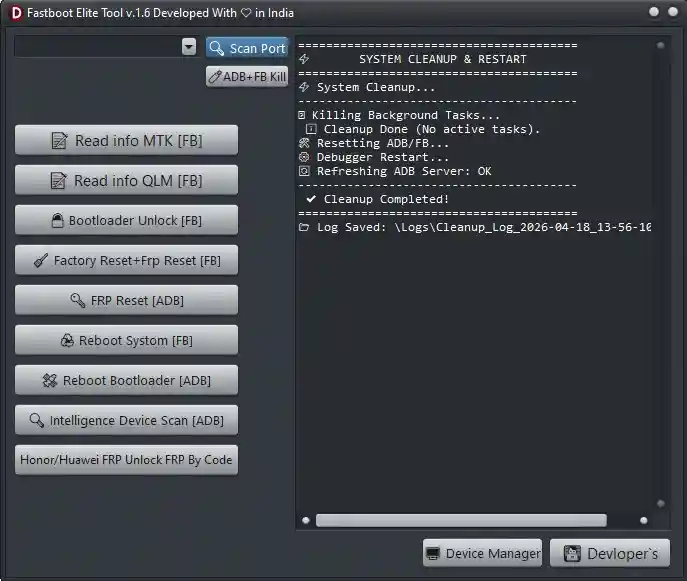
File Information
| Field | Details |
|---|---|
| File Name | Fastboot_Elite_Tool_v.1.6.7z |
| Version | v1.6 (Latest – April 2026) |
| File Size | 25 MB |
| Developer | RaviGautamTools |
| Platform | Windows |
| File Password | 123 |
| License | Free – No Activation Required |
| Supported OS | Windows 7 / 10 / 11 |
Download Fastboot Elite Tool v1.6
File Password: 123
⚠️ Warning: Download and use at your own risk. Always back up your device data before performing any FRP bypass, factory reset, or bootloader operation. For educational and testing purposes only.
Requirements
- A Windows PC or Laptop
- Windows 7 / 10 / 11 (32-bit or 64-bit)
- ADB & Fastboot USB Drivers installed on your PC
- USB Debugging enabled on the Android device (for ADB operations)
- Fastboot Mode accessible (for Fastboot operations)
- Disable Antivirus or Windows Defender before extracting and running the tool
How To Install and Use Fastboot Elite Tool v1.6
- Download the 7z file from any link above.
- Temporarily disable your antivirus before extracting.
- Extract the 7z file using 7-Zip with password 123.
- Open the extracted folder and right-click the EXE file → select Run as Administrator.
- Connect your Android device via USB cable.
- Enable USB Debugging on the device (Settings → Developer Options → USB Debugging) for ADB mode operations.
- Select the required function from the interface.
- Wait until the process completes — do not disconnect the device during operation.
⚠️ Important: Disable antivirus before extracting and running. The tool may be flagged as a false positive due to ADB and Fastboot communication components.
FAQ
What is Fastboot Elite Tool v1.6?
Fastboot Elite Tool v1.6 is a free lightweight Windows Android repair utility supporting MediaTek, Qualcomm, and Huawei/Honor devices. It covers FRP bypass via ADB, one-click factory reset + FRP wipe, bootloader unlock/relock, deep device info reading, intelligence device scan (RAM, storage, IMEI), battery diagnostics, and standard ADB/Fastboot operations.
Is Fastboot Elite Tool completely free?
Yes. The tool is completely free — no account, credits, or activation required. Just extract with password 123 and run as Administrator.
What is the file extraction password?
The 7z archive password is 123.
Which Android versions are supported?
The tool supports Android 5.1 through Android 17+, covering both older and the latest Android releases.
Which chipsets are supported?
The tool supports MediaTek (MTK) and Qualcomm chipsets, plus select Huawei and Honor devices for FRP unlock.
Do I need USB Debugging enabled?
Yes — for all ADB-based functions including FRP bypass and factory reset via ADB, USB Debugging must be enabled in Developer Options on the Android device before connecting.
More Tools ⇒