WorldlinkGSM Pro Tool is an advanced Windows-based professional GSM servicing platform designed for mobile technicians who work with Android devices on new security patches. It supports Samsung, MediaTek, Unisoc/SPD, Qualcomm, and Google Pixel devices and covers FRP removal, Knox Guard bypass, KG Direct Injection, MDM removal, firmware flashing, bootloader unlock/relock, NVRAM backup/restore, RPMB read/write, partition management, and a built-in Android Utility Engine with SuperPatcher and Universal VBMeta patch. The version shared here includes an unlimited login with credits — no purchase required.
WorldlinkGSM Pro Features
General Interface
- ✅ Communication Port Auto Detect
- ✅ Refresh / History / Clear Logs
- ✅ Live Logs Panel / Progress Bar
- ✅ Stop Operation Button
MTP Mode
- ✅ Read Info (MTP)
- ✅ Reboot to Download / Recovery / Fastboot
- ✅ Remove FRP OS 16
- ✅ Enable ADB OS 16
- ✅ Enable ADB (QR Code)
- ✅ Factory Reset
ADB Mode – Samsung / Qualcomm
- ✅ Samsung Unlock 2025
- ✅ New Patch 2026
- ✅ KG Direct Injection
- ✅ KG Completed (ADB)
- ✅ Premium Bypass OS 16 (4CR)
- ✅ Knox Guard Bypass 2026
- ✅ Read Info (ADB)
- ✅ Reboot (ADB)
MediaTek – META Mode
- ✅ Read Info / Enable ADB
- ✅ Remove PayJoy MDM / Kill Scorpio MDM
- ✅ Factory Reset / Remove FRP
- ✅ Partition Manager
- ✅ Boot META (Preloader)
- ✅ Backup NV / Sec (Raw)
- ✅ Cancel Operation
MediaTek – BROM / Preloader
- ✅ Read Flash Info / Read Partitions
- ✅ Write APP / Firmware
- ✅ Backup Preloader / Install GAPPS
- ✅ Reboot Fastboot / Recovery
- ✅ Erase FRP / Format All Flash
- ✅ Format Except Bootloader / Auto & Manual Format
- ✅ Unlock Bootloader / Relock Bootloader
- ✅ Backup NVRAM / Restore NVRAM
- ✅ Backup NVDATA / Restore NVDATA
- ✅ Read / Write RPMB
- ✅ Read / Write QCN
- ✅ Get Bootloader Code
- ✅ Unlock Network
MediaTek – ADB Mode
- ✅ Plugin Bypass 2026
- ✅ Disable Factory Reset / Disable OTA Updates
- ✅ Reset IT Admin
- ✅ Remove Plugin (Old Patch)
Android Utility Engine
- ✅ SuperPatcher EROFS Ablation
- ✅ MDM Knox Integration
- ✅ Universal Patch VBMeta
Supported Chipset Tabs
- ✅ Samsung
- ✅ MediaTek
- ✅ SPRD / Unisoc
- ✅ Qualcomm
- ✅ Google Pixel
- ✅ Android Utility
- ✅ Dashboard
Screenshots
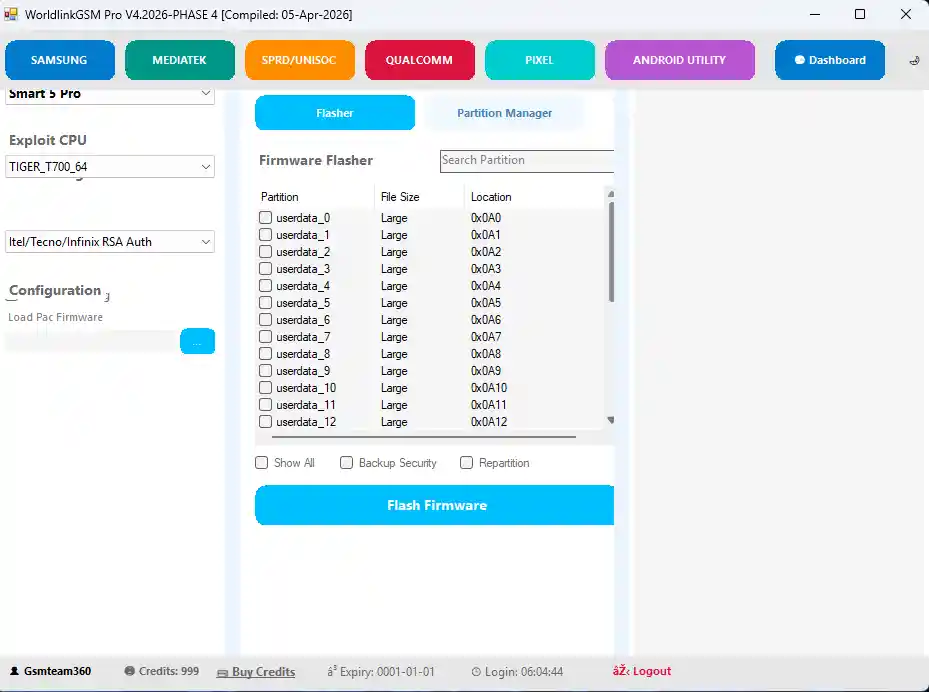
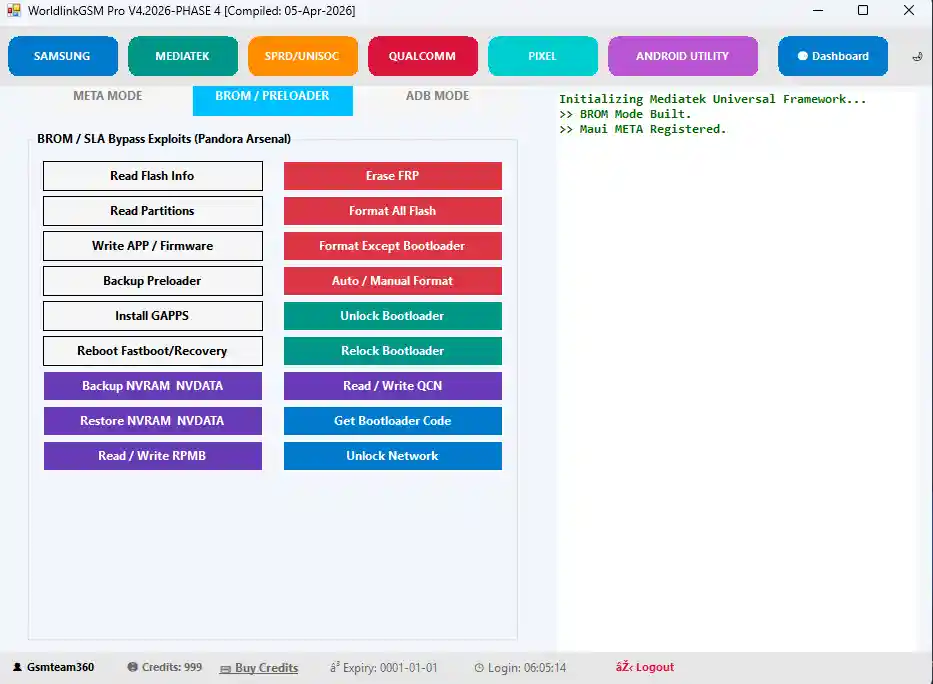
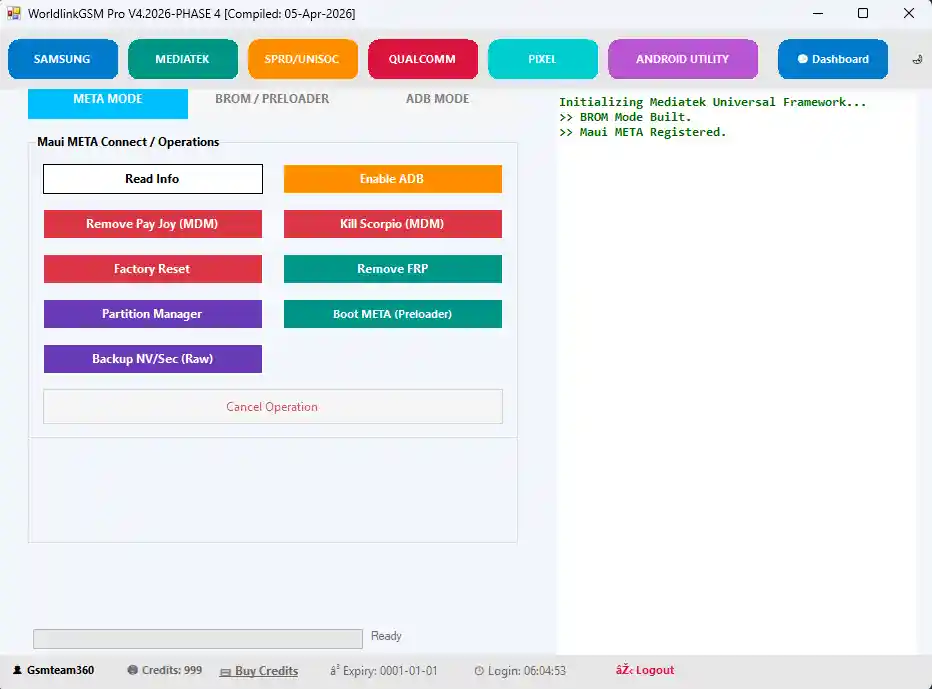
File Information
| Field | Details |
|---|---|
| Tool Name | WorldlinkGSM Pro Tool |
| Version | Latest (April 2026) |
| Platform | Windows |
| License | Credit-Based (Unlimited Login Shared) |
| Supported Chipsets | Samsung, MTK, Qualcomm, SPRD/Unisoc, Pixel |
Download WorldlinkGSM Pro Tool
⚠️ Warning: WorldlinkGSM Pro Tool is originally a paid credit-based platform. The version shared here includes an unlimited login provided by a third party — use at your own risk. Always back up your device data before performing any repair or flashing operation. For educational and testing purposes only.
Requirements
- A Windows PC or Laptop
- Windows 7 / 10 / 11 (32-bit or 64-bit)
- Samsung / MTK / Qualcomm USB Drivers installed
- Active internet connection (required for login and server-based operations)
- USB data cable to connect your Android device
- Disable Antivirus or Windows Defender before installation
How To Install and Use WorldlinkGSM Pro Tool
- Download the file from any link above and extract it to your PC.
- Disable antivirus before running the installer.
- Run the setup file as Administrator and complete the installation.
- Launch WorldlinkGSM Pro Tool from the Desktop shortcut.
- Log in using the provided unlimited account credentials.
- Connect your Android device via USB cable.
- Select the correct mode — MTP, ADB, META, or BROM — depending on your device and operation.
- Choose the required function from the relevant chipset tab.
- Press Start and follow the on-screen instructions.
- Wait for the process to complete — do not disconnect during operation.
⚠️ Important: Select the correct mode before starting any operation. Using the wrong mode may fail to detect the device or cause incomplete operations.
FAQ
What is WorldlinkGSM Pro Tool?
WorldlinkGSM Pro Tool is a professional Windows GSM platform supporting Samsung, MediaTek, Qualcomm, Unisoc/SPD, and Pixel devices. It covers FRP removal, Knox Guard bypass, KG Direct Injection, MDM removal, BROM firmware flash, bootloader unlock, NVRAM/NVDATA backup, RPMB operations, and Android Utility Engine functions including SuperPatcher and Universal VBMeta patch.
Is this tool free?
WorldlinkGSM Pro is originally a paid credit-based tool. The version shared here includes an unlimited login provided by a third party. Use responsibly and at your own risk.
What is KG Direct Injection?
KG Direct Injection is an ADB-based method used to bypass Samsung Knox Guard (KG) lock directly without entering the device into EDL or Download Mode. It is one of the headline features of the 2026 update alongside the new Knox Guard Bypass 2026 method.
What is the Android Utility Engine?
The Android Utility Engine is a set of advanced patch tools including SuperPatcher EROFS Ablation (for bypassing filesystem protections), MDM Knox Integration (for Knox MDM removal), and Universal Patch VBMeta (for patching the verified boot metadata to allow modified partitions).
Which connection modes does it support?
The tool supports MTP Mode, ADB Mode, Odin Mode, META Mode, and BROM/Preloader Mode — covering everything from standard ADB operations to deep-level BROM flash and partition management.
Does it support OS 16 (Android 16) FRP?
Yes. The MTP tab includes Remove FRP OS 16 and Enable ADB OS 16 functions, and the ADB tab includes Premium Bypass OS 16 (4CR) — making it compatible with the latest Android 16 security patches.
More Tools ⇒