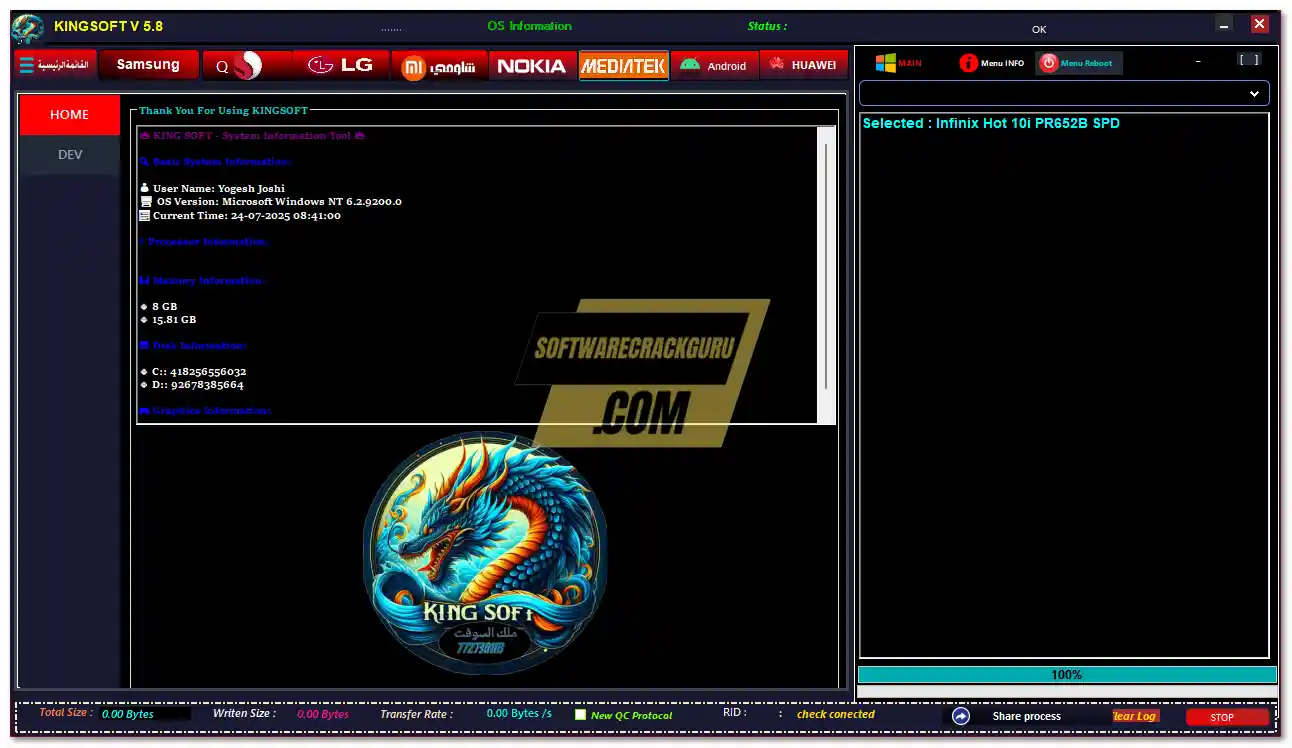
King Soft Tool V5.8 is the latest free multi-function Android repair utility developed by the King Soft Team. It supports Samsung, MediaTek, Huawei Kirin, Qualcomm EDL, LG, Oppo, Vivo, and Xiaomi devices and covers FRP removal, factory reset, Knox disable, ADB utilities, MTK bootloader unlock, IMEI repair, Huawei OEMINFO backup, Mi Account bypass, VoLTE enabling, MDM removal, and more — all inside a single tabbed Windows interface. V5.8 adds full Android 15 and One UI 7 support, improved Arabic translation, a cleaner UI/UX, and community-driven bug fixes. The tool is completely free — login details are pre-filled, so just run and go.
King Soft Tool Features
Samsung – FRP Test Mode
- ✅ Remove FRP
- ✅ Remove FRP (New Security) – Normal Mode
- ✅ Remove FRP (New Security) – Rapid Mode (Low-spec PC friendly)
- ✅ Factory Reset
- ✅ Disable Knox
- ✅ Disable Factory Mode
FRP MTP
- ✅ Factory Reset
- ✅ Enable Secret Code for Verizon
ADB Functions
- ✅ Read CSC List / Change CSC
- ✅ Remove Samsung Account
- ✅ Enable Data Icon
- ✅ Enable / Disable Convert CSC
- ✅ Network Mode (ADB)
- ✅ Enable Unknown Sources
- ✅ ADB Remove Lock
- ✅ Enable Diag Mode
- ✅ Remove FRP (Old)
- ✅ Fix Network
- ✅ Remove China / Verizon Apps
Download Mode
- ✅ FRP Android 5/6 (Method 1 & 2)
- ✅ Erase FRP Download
- ✅ Reboot Download
- ✅ Softbrick Fix
- ✅ Factory Reset
Root Functions
- ✅ Change CSC / Change CSC (Manual)
FRP QR Code
- ✅ QR Code 1 / QR Codes 2 to 4
Knox
- ✅ Turn Off Knox via ADB
Xiaomi – ADB Tool
- ✅ Read Info
- ✅ Bypass MiCloud Android 8.1
- ✅ [ROOT] Enable Diag Mode
Xiaomi – Sideload
- ✅ Factory Reset / Remove FRP / Reset MiCloud Info / Reset MiCloud Lock
- ✅ [Qualcomm] Bypass MiCloud Lock (Anti-Relock)
- ✅ [Qualcomm] Remove Bypass MiCloud Lock
- ✅ [Unlocked] Remove FRP (Fastboot Mode)
LG – EDL
- ✅ Factory Reset / Erase FRP (EDL)
LG – Flash
- ✅ Load KDZ Firmware / Start Flash / MTP Factory Reset
LG – ADB Services
- ✅ Convert to CDMA / Convert to Global
- ✅ Engineering Mode (MTK) / APN Settings / Open Hidden Menu
- ✅ Band Mode MTK / Enable Diag / Unlock Sprint
- ✅ Fix Hands-Free (HFA) / Fix Network/CDMA Issues / MCFG List
Android – ADB Tools
- ✅ Battery Info / Set Language
- ✅ Disable / Enable OTA Update / Factory Reset
- ✅ Hide Developer Options / [SU] Remove Screen Lock
- ✅ Open Browser / Erase FRP
Android – App Manager
- ✅ Enable / Disable System & User Apps / Delete Bloatware
- ✅ Install APK / XAPK / APKs
Qualcomm EDL
- ✅ Read GPT / Backup / Erase
- ✅ Flash via Loader / Patch XML / Raw XML
- ✅ Auto Loader Support
MediaTek (MTK)
- ✅ Bypass FRP (Method 1 & 2)
- ✅ Bypass FRP for Mi Account (Method 1, 2 & Tamil Method)
- ✅ Format Userdata / FRP Samsung / FRP Mi Account
- ✅ Boot Info GPT / Read GPT / Auth Bypass
- ✅ Format META Mode / Boot META Mode
- ✅ Write / Read PERSIST.IMG
- ✅ Safe Format MISC / Safe Format PRRA
- ✅ Remove Demo (Oppo / Vivo)
- ✅ Restore IMEI / Backup IMEI
- ✅ Bootloader Unlock / Relock / Permanent Unlock
- ✅ Huawei OEMINFO Backup
- ✅ Reset Keep Data (Method 1 & 2)
- ✅ Fix Recovery ERES / Fix Unknown Baseband
- ✅ Boot Stage 1 & 2
Huawei Kirin FRP
- ✅ Bypass FRP via Test Point (Kirin Chipset)
- ✅ Expanded Huawei Model Support via Test Point Method
VoLTE
- ✅ Enable VoLTE on All Devices
- ✅ Samsung IMS & APN Settings
- ✅ Enable VoLTE (Android 13)
New Tab Tools
- ✅ UICC Network Unlock
- ✅ Disable MDM
- ✅ Call Recorder (All Android – Method 2)
- ✅ Remove Mi Cloud
- ✅ Fix Bootloop
- ✅ Unlock Samsung China Tel/R
- ✅ Unlock Network
- ✅ Install MoreLocale
- ✅ Exit Upload Mode
- ✅ Fix App Install After FRP Bypass
Arabic Translation Tools
- ✅ Remove Arabic / Arabic Keyboard
- ✅ Arabic MoreLocale (Method 1 & 2)
- ✅ Arabic Support (Android 6–15, No Theme)
- ✅ Enable / Disable Dark Mode
Main Menu Utilities
- ✅ Driver Signature Enable / Disable
- ✅ Windows Defender Toggle
- ✅ ADB via WiFi / Android Emulator
- ✅ Install Samsung Drivers / Install Visual C++ 2015
- ✅ Kill ADB Session / Mobile Driver Manager
Supported Devices
Motorola (KG/MDM Bypass) – Rzr 50 Ultra, G85 5G, Edge 30/50 Series, G73 5G, and 45+ XT series models
Oppo – A Series (A3S through A96), F Series (F1–F19s), Reno 3–8 + X10 Zoom, Find X2 Lite through X5 Pro, K9s, R9s, Mirror5
Realme – 7/7i/8/9 Series, C15/C17, GT2 Pro, GT Neo2/Neo3T, Q5 Pro, X2 Pro, X3, X50 5G
Huawei / Honor – Honor 5X–50 Lite, Huawei Y6/Y7/Y9/P9/Tab series, T1-A21L, T3 KOB-L09, AGS-L09
Xiaomi / POCO – Redmi 3–6 Pro, Note 10/12, 4A–5A, 5 Plus, POCO F1
Nokia – TA-1000, TA-1024, TA-1033, TA-1044
LG – G8, V40–V60 Series, LG Wing, Velvet 5G
TCL – 4056L, 4056S, 5062W, T782P, T790S
Samsung (EDL Mode) – Galaxy A01–A52/A72, Fold Series (F711U/F721U/F916U/F926B/F936U), S Series (G781U/V, G970U, G973U, G975U, G981U, G986U, G988U), Note N975 8BIT
Screenshots


Changelogs
V5.8 — July 24, 2025
[New] Full Android 15 & One UI 7 Support
[New] Arabic language translation improvements and better UI rendering
[Enhancement] Refined UI/UX design – features organized by category for quicker access
[Fix] Unresponsive buttons on certain devices
[Fix] Errors accessing specific options resolved
[Enhancement] Community-driven bug fixes based on user feedback
[Info] New functionalities added to keep up with latest device updates

V5.7
[New] Kirin FRP Section Added – Bypass FRP on Kirin Huawei via Test Point
[New] Expanded Huawei FRP Test Point – more models supported
[New] EDL Models Section – new Qualcomm models for direct EDL operations
[New] New Qualcomm Tool with MDM/KG bypass, flashing, FRP tools
[New] Samsung EDL Mode Support:
      A Series: A01–A52, A72
      Fold: F711U, F721U, F916U, F926B, F936U
      S Series: S124DL, G781U/V, G970U, G973U, G975U, G981U, G986U, G988U
      Note: N975 8BIT
[New] Free WhatsApp Utility Section
[Enhancement] Faster device recognition and execution
[Enhancement] Improved stability across modules
[Enhancement] Refined GUI with updated layout

V5.5 — 2025
[New] Samsung COM Detection Enhanced (COM9 – Samsung Mobile USB Modem)
[New] Auto Reboot / Auto Repair GPT
[New] BROM Ready Mode
[New] Device Identify / Read Info
[New] Updated DA File (Download Agent)
[New] Custom Preloader Support
[Enhancement] MTK Scatter File compatibility expanded

V5.4
[Fix] App installation after FRP bypass
[New] Disable MDM Protection option
[Fix] Call recording – two methods now supported
[New] Remove Mi (Xiaomi) Account option
[Fix] Reboot-to-recovery mode issue
[New] Arabic language support added across most sections
[Fix] Minimize button issue in interface
[Fix] Various bugs from previous version
[New] Several new features and performance improvements
File Information
| Field | Details |
|---|---|
| File Name | King_Soft_Tool_V5.8.zip |
| Version | V5.8 (Latest – July 24, 2025) |
| Developer | King Soft Team |
| License | Free – Login Pre-Filled (No Manual Entry) |
| Supported OS | Windows 7 / 10 / 11 (32-bit & 64-bit) |
Download King Soft Tool V5.8
Download King Soft Tool V5.8 – Proton Drive (Latest)
⚠️ Warning: Download and use at your own risk. Always back up your device data before performing any FRP bypass, factory reset, or MTK flashing operation. For educational and testing purposes only.
Previous Versions
| Version | Download |
|---|---|
| King Soft Tool V5.7 | Proton Drive |
| King Soft Tool V5.6 | Proton Drive |
| King Soft Tool V5.5 | JioAICloud |
| King Soft Tool V5.4 | JioAICloud |
Requirements
- A Windows PC or Laptop
- Windows 7 / 10 / 11 (32-bit or 64-bit)
- Samsung / MTK / Qualcomm USB Drivers installed on your PC
- Disable Antivirus or Windows Defender before running the tool
- USB cable to connect your Android device
How To Install and Use King Soft Tool V5.8
- Download the zip file from the link above and extract it using WinRAR or 7-Zip.
- Disable your antivirus before running the setup file.
- Open the extracted folder and run the setup (.exe) file as Administrator.
- Follow the installation steps and wait for it to finish.
- Go to your Desktop, right-click the King Soft Tool shortcut and select Run as Administrator.
- The loading bar will appear — wait until it reaches 100%.
- When the login screen appears, just click Login — credentials are pre-filled, do not change them.
- Install all drivers from inside the tool if needed — skip if drivers are already installed.
- Connect your Android device via USB, select the required tab and function, then follow the on-screen steps.
⚠️ Important: Do not modify the pre-filled login credentials. Disable antivirus before installation and launch. Use dedicated repair PC for best results.
FAQ
What is King Soft Tool?
King Soft Tool is a free multi-brand Android repair utility supporting Samsung, MediaTek, Huawei Kirin, Qualcomm EDL, LG, Oppo, Vivo, and Xiaomi devices. It covers FRP removal, factory reset, Knox bypass, MTK bootloader unlock, IMEI repair, MiCloud bypass, MDM removal, VoLTE enabling, and more.
Is King Soft Tool completely free?
Yes. The core tool and most functions are completely free. Some sections like WhatsApp utilities and 4G Tab options require a separate paid activation available from within the program. No credits are needed for Samsung, MTK, ADB, or Qualcomm EDL operations.
Do I need to enter login details manually?
No. Login credentials are pre-filled and saved on your system. Simply click Login on the login screen and the tool opens automatically.
Does V5.8 support Android 15 and One UI 7?
Yes. Full Android 15 and One UI 7 compatibility is the headline addition in V5.8, making it compatible with the latest Samsung devices and firmware versions.
Does the tool support Huawei Kirin FRP?
Yes. A dedicated Kirin FRP section (added in V5.7, carried forward in V5.8) bypasses FRP on Kirin-based Huawei devices via the Test Point method, with an expanded model database included.
Does it support Samsung EDL mode?
Yes. Samsung EDL mode support was added in V5.7 and expanded in V5.8, covering Galaxy A, S, Note, and Fold series models in EDL mode for FRP, factory reset, and flashing operations.
More Tools ⇒