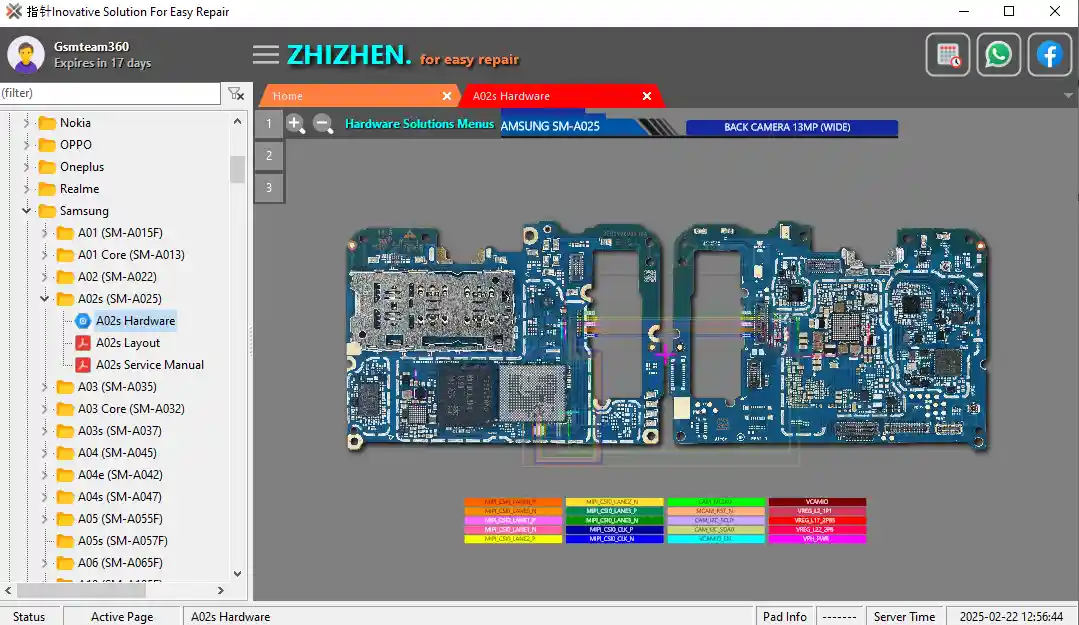
Zhizhen Schematics is a free Windows-based hardware reference tool for mobile, laptop, and desktop repair technicians. It provides detailed motherboard schematics and circuit diagrams for Android smartphones, iPhones, iPads, tablets, and laptops — covering 30+ major brands including Samsung, Xiaomi, Huawei, Apple, OPPO, Vivo, OnePlus, Realme, Nokia, LG, Sony, Motorola, Asus, and more. The tool helps technicians visually trace circuit lines, identify damaged ICs, find component locations, and diagnose hardware faults quickly without needing to search through scattered PDF documents or online databases. It is completely free — no account, activation, or subscription required. Extract to C: drive before running.
Zhizhen Schematics Features
- ✅ Full Motherboard Schematics for Android Smartphones
- ✅ iPhone & iPad Hardware Circuit Diagrams
- ✅ Laptop & Desktop Motherboard Diagrams
- ✅ Tablet Schematic Diagrams
- ✅ Watch Phone Diagrams
- ✅ IC Location Maps & Component Reference
- ✅ Circuit Line Tracing for Hardware Fault Diagnosis
- ✅ High-Definition Diagram View with Zoom Support
- ✅ Search by Brand and Model
- ✅ 30+ Supported Brands (Android, Apple, Laptop)
- ✅ Offline Access – No Internet Required After Install
- ✅ Free – No Account or Activation Required
Supported Brands
Smartphones
- ✅ Alcatel
- ✅ Apple (iPhone)
- ✅ Asus
- ✅ BlackBerry
- ✅ Black Shark
- ✅ Honor
- ✅ Huawei
- ✅ Infinix
- ✅ Itel
- ✅ Jianguo
- ✅ LG
- ✅ Lava
- ✅ Lenovo
- ✅ Meizu
- ✅ Micromax
- ✅ Motorola
- ✅ Nokia
- ✅ OPPO
- ✅ OnePlus
- ✅ Realme
- ✅ Samsung
- ✅ Sharp
- ✅ Sony
- ✅ Tecno
- ✅ Umidigi
- ✅ Vivo
- ✅ Xiaomi
- ✅ ZTE
- ✅ iQOO
Other Devices
- ✅ Tablets
- ✅ Watch Phones
- ✅ Laptops / Desktops
Screenshots


File Information
| Field | Details |
|---|---|
| Tool Name | Zhizhen Schematics |
| Version | Latest (2025) |
| Platform | Windows |
| Supported Devices | Android / iPhone / iPad / Laptop / Desktop |
| Extract To | C: Drive (Required) |
| License | Free – No Activation Required |
Download Zhizhen Schematics Tool
⚠️ Warning: This tool is a hardware reference tool only — it does not connect to or modify any device. For professional hardware repair and educational use only. Download and use at your own risk.
Requirements
- A Windows PC or Laptop (Windows 7 / 8 / 10 / 11)
- Sufficient disk space for the schematic database
- Extract all files to C: drive before installing (important)
- Disable Antivirus or Windows Defender before installation
How To Install and Use Zhizhen Schematics Tool
- Download the ZIP file from any link above.
- Extract all files to C: drive — for example:
C:\Zhizhen(do not extract to Desktop or other folders). - Disable your antivirus before running the setup.
- Open the extracted folder and run the setup file following the basic on-screen instructions.
- Launch Zhizhen from the Desktop shortcut or Start Menu.
- Install all drivers if prompted — skip if already installed.
- Select the required brand from the left panel.
- Browse or search for your device model.
- View the available diagrams — schematic, PCB layout, IC map, or component reference.
- Use Zoom In / Out to inspect circuit paths and component locations in detail.
⚠️ Important: Always extract to C: drive. Extracting to the Desktop or user folders may cause path errors during installation.
FAQ
What is Zhizhen Schematics Tool?
Zhizhen Schematics is a free Windows hardware reference tool for mobile, laptop, and desktop repair technicians. It provides motherboard schematics, IC location maps, circuit diagrams, and component reference for 30+ brands covering Android smartphones, iPhones, iPads, tablets, watch phones, and laptops.
Is Zhizhen Schematics completely free?
Yes. The tool is completely free — no account, activation, subscription, or payment required.
Does it connect to my phone or laptop?
No. Zhizhen Schematics is a reference-only tool — it does not connect to, communicate with, or modify any device. It is used alongside physical hardware repair work to provide circuit diagrams.
Which brands are supported?
The tool supports 30+ brands including Samsung, Xiaomi, Huawei, Apple, OPPO, Vivo, OnePlus, Realme, Nokia, LG, Sony, Motorola, Asus, Lenovo, Tecno, Infinix, Itel, Meizu, ZTE, iQOO, Google, BlackBerry, Black Shark, Sharp, Umidigi, Lava, Micromax, Coolpad, and more.
Why must I extract to C: drive?
Extracting to C: drive ensures the tool has correct file path access during installation. Extracting to the Desktop or restricted user folders may cause setup or runtime errors.
How is Zhizhen different from Wuxinji?
Both are free hardware schematic reference tools popular in the GSM repair community. Wuxinji (WXJ) is known for its large database of 3,637+ models with detailed repair guides including non-charging and no-backlight solutions. Zhizhen covers a broad range of brands across Android, Apple, laptop, and desktop platforms with a similar reference format. Many technicians keep both tools installed for cross-referencing.
More Tools ⇒