
Typhon Tool is a modern multi-chipset Android servicing platform designed for mobile repair work on Qualcomm, MediaTek, and Unisoc devices. Instead of using separate tools for each chipset, Typhon Tool brings all major functions into one clean tabbed interface — covering EDL mode flashing, BROM/DA firmware operations, FRP reset, EFS backup/restore, partition management, ADB utilities, Fastboot tools, and even bulk flashing for multiple devices simultaneously. The software supports both UFS and eMMC storage types and is compatible with modern chipsets including Snapdragon 8 Elite, Dimensity 9400, and Unisoc T-series. An offline HWID-based loader is included — tested and confirmed working 100%.
Typhon Tool Features
Qualcomm EDL Functions
- ✅ Firmware Flashing in EDL Mode
- ✅ Automatic Loader Detection
- ✅ Manual Custom Loader Support
- ✅ Partition Read & Write
- ✅ EFS Backup & Restore
- ✅ FRP Reset
- ✅ Mi Cloud Reset
- ✅ Userdata Erase
- ✅ Firmware Dump Support
- ✅ Sideload Functions
- ✅ Boot Configuration Options
- ✅ UFS & eMMC Storage Support
MediaTek BROM / DA Functions
- ✅ Flash Firmware via Scatter File
- ✅ Download Only Mode
- ✅ Firmware Upgrade Mode
- ✅ Format All + Download Mode
- ✅ FRP Erase
- ✅ Userdata Wipe
- ✅ Security Backup & Restore
- ✅ ENG Preloader Flashing
- ✅ Device Information Reading
- ✅ Partition Backup & Erase
- ✅ Custom DA File & Auth File Support
- ✅ Dimensity & Helio Series Support
Unisoc Functions
- ✅ Firmware Flashing
- ✅ Partition Management
- ✅ FRP Reset
- ✅ Factory Reset
- ✅ Bootloader Unlock
- ✅ Fastboot Servicing Functions
- ✅ Device Information Reading
ADB Functions
- ✅ Read Device Information
- ✅ Reboot to System / Recovery / Bootloader / EDL Mode
- ✅ Xiaomi Diagnostic Mode
Fastboot Functions
- ✅ Read Device Details
- ✅ Flash Selected Partitions
- ✅ Reboot Functions
- ✅ EFS Erase
- ✅ NV Erase
Bulk Flashing Functions
- ✅ Flash Multiple Devices Sequentially
- ✅ Start All Devices Together
- ✅ Stop All Operations
- ✅ Skip EFS During Flashing
- ✅ Auto Reboot After Completion
- ✅ Loader & Firmware Configuration Support
Supported Chipsets
Qualcomm Snapdragon
- ✅ Snapdragon 8 Elite / 8 Gen 3 / 8 Gen 2
- ✅ Snapdragon 888 / 888+
- ✅ Snapdragon 870 / 865 / 855
- ✅ Snapdragon 778G / 765G / 750G
- ✅ Snapdragon 695 / 680 / 660
- ✅ Snapdragon 480 / 460 / 450
MediaTek Dimensity & Helio
- ✅ Dimensity 9400 / 9300 / 9200
- ✅ Dimensity 8300 / 8200 / 8100
- ✅ Dimensity 7200 / 7050 / 7020
- ✅ Helio G99 / G96 / G95
- ✅ Helio G90T / G88 / G85
- ✅ Helio P65 / P60 / P35
Unisoc
- ✅ T606 / T610 / T612 / T616
- ✅ SC9863A
Screenshots
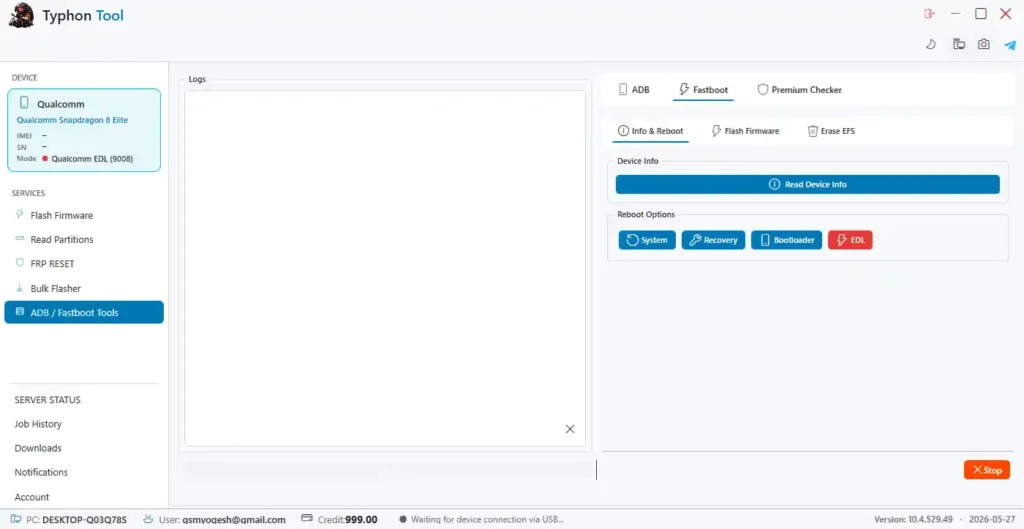
File Information
| Field | Details |
|---|---|
| File Name | Typhon_Tool_Offline_Loader.rar |
| Version | Latest (May 2026) |
| Developer | Typhon Tool Team |
| Loader Type | Offline HWID-Based Activation |
| File Password | softwarecrackguru |
| Supported OS | Windows 10 / 11 (64-bit) |
| Tested | Yes – 100% Working |
Download Typhon Tool
File Password: softwarecrackguru
⚠️ Warning: Download and use at your own risk. Always back up EFS, security partitions, and personal data before performing any flash or repair operation. Incorrect firmware files or wrong loaders may cause boot problems or data loss.
Requirements
- A Windows PC or Laptop
- Windows 10 or Windows 11 (64-bit recommended)
- WinRAR or 7-Zip to extract the file (password: softwarecrackguru)
- Qualcomm / MTK / Unisoc USB Drivers installed on your PC
- Compatible DA file and auth file for MediaTek operations
- Custom loader file for some Qualcomm models
- Disable Antivirus or Windows Defender before running the tool
How To Install and Activate Typhon Tool
- Download the RAR file from the link above and extract it using WinRAR or 7-Zip (password: softwarecrackguru).
- Run the setup file as Administrator (right-click → Run as Admin).
- Select the installation folder, create shortcuts if needed, and complete the setup wizard.
- After installation, the registration window will open automatically.
- Copy your Hardware ID (HWID) from the registration window.
- Open the activation page and paste your HWID to generate an activation key.
- Copy the generated token and paste it into the software’s activation field.
- Click Register — once complete, the main dashboard will open.
- Select your chipset platform tab (Qualcomm / MediaTek / Unisoc / ADB / Fastboot) and connect your device via USB.
⚠️ Important: For MediaTek devices, make sure you have compatible DA and auth files loaded before starting operations. For Qualcomm, some models may require a custom loader depending on device security level.
FAQ
What is Typhon Tool?
Typhon Tool is a multi-chipset Android servicing platform combining Qualcomm EDL, MediaTek BROM/DA, Unisoc, ADB, Fastboot, and Bulk Flashing operations in a single tabbed interface. It supports firmware flashing, FRP reset, partition management, EFS backup/restore, and more across modern Snapdragon, Dimensity, Helio, and Unisoc chipsets.
Is Typhon Tool free to use?
Yes, the tool includes a free offline HWID-based loader. Extract the package, run the setup, copy your HWID, generate a free activation key from the activation page, and register to unlock the full dashboard.
What is the RAR file password?
The file extraction password is softwarecrackguru. Use WinRAR or 7-Zip to extract the archive with this password.
Does Typhon Tool work offline?
Yes. Typhon Tool is designed for offline usage, which avoids server dependency during flashing and repair operations. Internet is only required during the initial HWID activation step.
Which storage types does the Qualcomm module support?
The Qualcomm module supports both UFS (Universal Flash Storage) and eMMC storage types, making it compatible with a wide range of modern Snapdragon-powered devices.
What DA and auth files are needed for MediaTek?
For MediaTek operations, you need a compatible DA (Download Agent) file and, for newer secure devices, an authentication file or certificate. Custom DA files for specific models can be loaded manually through the tool interface.
More Tools ⇒