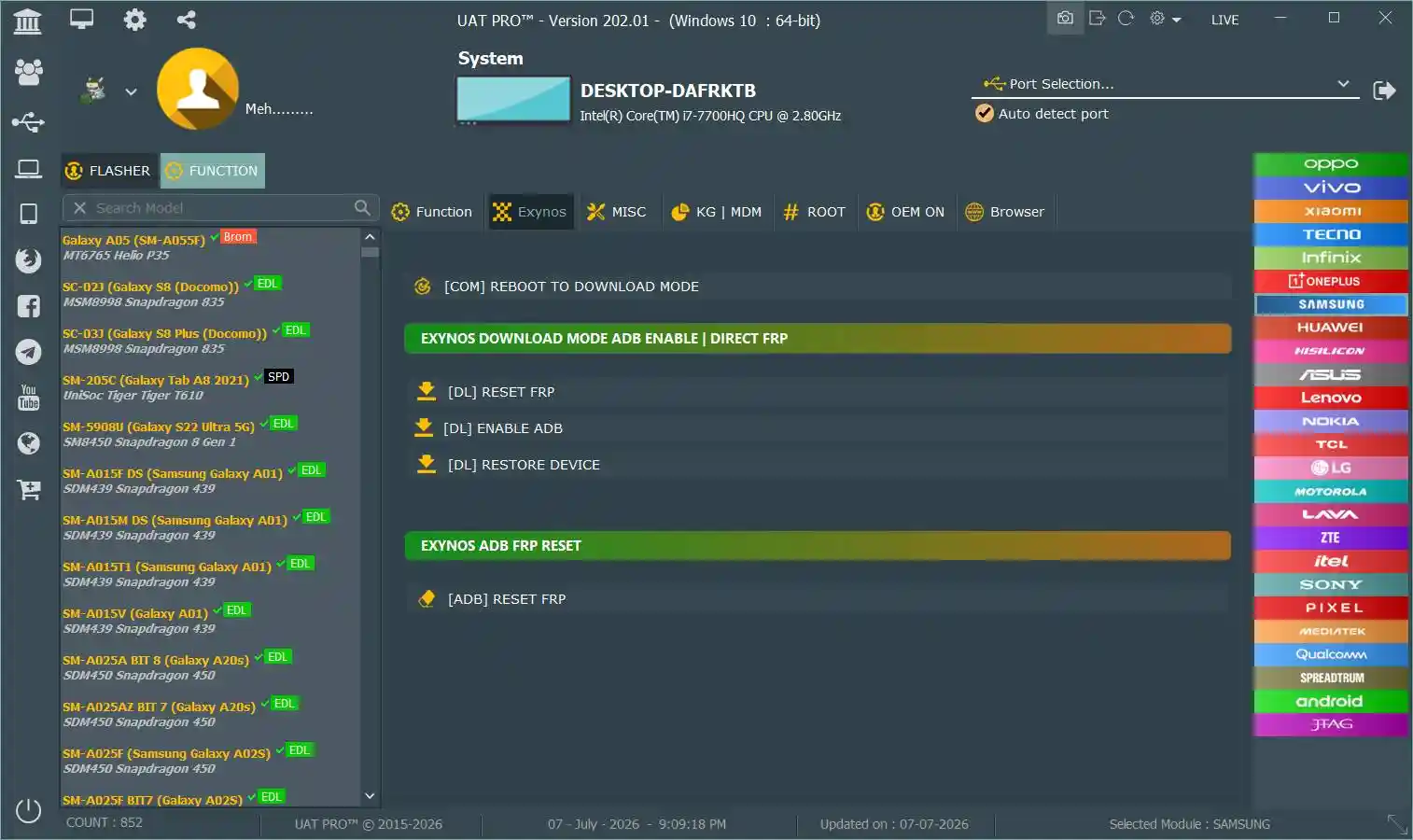
UAT PRO Tool V202.01 is the latest release of the well-known professional Android repair platform from the Uni-Android Team (UAT), celebrating 9 years of active development. It supports Samsung, Xiaomi, Huawei/Honor, Oppo, Vivo, Realme, Tecno, Infinix, Itel, Lava, Hisense, Mobicel, Ai+, and other Android devices through Qualcomm EDL, MediaTek BROM/Preloader, ADB, and Fastboot modes. Functions include FRP removal, factory reset, firmware flash, IT Admin removal, Samsung new BIT support, Xiaomi bootloader unlock, Huawei Preloader FRP/flash (no test point), IMEI repair, screen lock removal, MDM removal, and bootloader unlock/relock. V198.01 adds Xiaomi Bootloader Unlock for the Xiaomi 17 series and Redmi K90 Pro Max, plus new Mobicel, Hisense, and Ai+ model support. The official download is at uni-android.com.
UAT PRO Tool Features
General Functions
- ✅ FRP Lock Remove
- ✅ Factory Reset / Userdata Format
- ✅ Screen Lock / Pattern / PIN / Password Remove
- ✅ MDM Remove / IT Admin Remove (Android 11–14)
- ✅ Bootloader Unlock / Relock
- ✅ Firmware Read / Write / Flash
- ✅ IMEI Repair
- ✅ Mi Account Reset / Disable Mi Cloud
- ✅ Samsung New BIT & New Model Support
- ✅ Huawei Preloader Mode (No Test Point)
Supported Chipsets & Modes
- ✅ Qualcomm EDL (9008) – Auto-Detection + Updated Loaders Database
- ✅ MediaTek BROM / Preloader – MT6761 through MT6893
- ✅ ADB Mode – FRP, Mi Account Disable, OTA Disable
- ✅ Fastboot Mode – Bootloader Operations
IT Admin Remove (V184.02+)
- ✅ Supported Android Versions: Android 11 – 14
- ✅ Supported Brands: Oppo, Vivo, Xiaomi, Samsung, Tecno, Infinix, Itel
- ✅ Auto Reset in 2 Hours (Auto-Expire Safety Feature)
Changelogs
V198.01 — March 27, 2026
[New] Xiaomi Bootloader Unlock (via ADB connection)
      – Erases all data / Logs out Xiaomi Account
      – Removes Fingerprints / Disables Find My Device / Removes Screen Locks
      Supported Models:
        Xiaomi 17 (pudding)
        Xiaomi 17 Pro (pandora)
        Xiaomi 17 Pro Max (popsicle)
        Xiaomi 17 Ultra (nezha)
        Redmi K90 Pro Max (myron)
[New] Ai+ Models Added: Ai+, Ai+ PULSE 1
[New] Mobicel Models Added:
      K120 (Tredy lite / berry), K210 (Fame / Ruby), K101 MDD (Ultra / Astro / EGO)
      K130 (Berry 2), RIO SS, Glo, BLINK, Star, Y4, X4, Legend, Pulse 1, Pure
      R6 Plus, R7 NC 1, Switch 1, Multilaser MSE, PX10, PX8, F51
[New] Hisense Models Added:
      E32 Lite (HLTE106E), E33 (HLTE243E), E40 (HLTE229E), E40 Lite (HLTE223E)
      E50 Lite (HLTE228E), E60 (HLTE236E_10), E60 Lite (HLTE235E)
      H30 Lite (HLTE223E_10/11), Infinity H30 Lite (HLTE223E/22)
      Infinity H40 (HLTE230E), Infinity H40 Lite, U3 (KS964)
      U3 2021 (HLTE100E_21), U31 2021 (U607), U40 Lite (HWCD100E)
      U50 (HLTE222E), U50 Lite (HWCD103E), U60 (HLTE235SE), U60 Lite (HWCD108E)
      U70 Pro (HLTE109E)

V185.02
[New] Samsung Qualcomm – New BIT and New Models

V185.01
[New] Huawei Preloader Mode – No Test Point Required
      Functions: FRP Reset, Factory Reset, Read Backup, Flash
      MT6765 Models:
        Honor X7a (RKY-LX1/2/3), Honor X6 (VNE-LX1/2/3), Honor X6a (WDY-LX1/2)
        Honor X5 Plus (WOD-LX1/2/3), Honor X5b (GFY-LX2), Honor X5b Plus (GFY-LX2P)
        Honor 8A Prime (JAT-LX1), Honor 8A Pro (JAT-L41), Honor Play 8A (JAT-L09)
        Honor Y6s (JAT-L29 / JAT-LX3)
      MT6833 Models:
        Honor 200 Lite (LLY-NX1), Honor 90 Smart (CLK-NX1/N31/NX3)
        Honor 90 Lite 5G (CRT-NX1/N31), Honor X40i (DIO-AN00)
        Honor X50i (CRT-AN00), Honor X50i Plus (LLY-AN00)
        Honor Play 40 Plus (RKY-AN00), Honor Play 50 Plus (CLK-AN00)
        Honor Play7T (RKY-AN10), Honor Play 8T (CLK-AN00)
      MT6768 Models:
        Honor X6b (JDY-LX1/2), Honor Play 20 Pro (JDY-L29/LX2)

V184.02
[New] IT Admin Remove (Auto reset in 2 hours)
      Android 11 – 14 / Oppo, Vivo, Xiaomi, Samsung, Tecno, Infinix, Itel
[New] Samsung Qualcomm New BIT & Models:
      Galaxy A: A01 (SM-A015V), A02s (SM-A025U BIT6), A05s (SM-A057F BIT8)
      A11 (SM-A115AZ), A23 (SM-A235E/F/M BIT9), A23 5G (SM-A236B/U BIT9)
      A42 5G (SM-A426B/U BIT8-9), A52 5G (SM-A526U BIT-G)
      A52s 5G (SM-A528B BIT-A), A70 (SM-A705GM BIT5), A71 5G UW (SM-A716V BIT9)
      A72 (SM-A725F BIT-A), A73 5G (SM-A736B BIT-A)
      Quantum 2 (SM-A826S BIT6), A90 5G (SM-A908B BIT9)
      Galaxy F: F14 4G (SM-E145F BIT6), F23 (SM-E236B BIT8)
      Z Flip: Z Flip 5G (SM-F707N BIT5), Z Flip3 (SM-F711B BIT-B)
      Z Flip4 (SM-F721N BIT5), Z Flip5 (SM-F731B BIT4), Z Flip6 (SM-F741B BIT2)
      Z Fold: Fold (SM-F900F BIT7), Z Fold2 (SM-F916N BIT4)
      Z Fold3 (SM-F926N/U BIT6-9), Z Fold5 (SM-F946B BIT4), Z Fold6 (SM-F956B/0 BIT2)
      Galaxy S: S8+ (SM-G955U BIT8), S9 (SM-G9600 BIT9), S9+ (SM-G9650 BIT9)
      S20 FE 5G (SM-G781B/N/U BIT H-9-K), S20 5G (SM-G981N BIT5-6 / SM-G981V BIT-C)
      S20+ 5G (SM-G986N/U BIT7-C), S20 Ultra (SM-G988U BIT-C)
      S21 FE 5G (SM-G990B2 BIT-A / SM-G990U/U2/U3 BIT E-C / SM-G9900 BIT-B)
      S21 5G (SM-G9910 BIT-B / SM-G991U BIT-E)
      S21+ 5G (SM-G996U BIT-E), S21 Ultra 5G (SM-G998U BIT-E)
      Note20 5G (SM-N981N BIT5), M42 5G (SM-M426B BIT9), M52 5G (SM-M526BR BIT6)

V177.01
[Enhancement] Tecno / Infinix Preloader Authorization (2024)
              Chipsets: MT6765, MT6761, MT6768, MT6833, MT6893
[New] Lava Preloader Authorization
      Chipsets: MT6761, MT6765, MT6768, MT6781, MT6785, MT6789, MT6833, MT6877, MT6893
[Fix] MTK Flashing / MTK Read Info / MTK Reset Mi Account
[Enhancement] Qualcomm Protocol – More models by auto-detection
[Update] Qualcomm internal loaders database
Screenshots
File Information
| Field | Details |
|---|---|
| Tool Name | UAT PRO Tool |
| Version | V202.01 (Latest – July 07, 2026) |
| Developer | Uni-Android Team (UAT) |
| Platform | Windows |
| Official Download | uni-android.com |
| Extract To | C: Drive (Required) |
| License | Paid (Official Account Required) |
Download UAT PRO Tool V202.01
Download via Official Website (uni-android.com)
⚠️ Important: UAT PRO Tool is an officially paid tool. A valid UAT account and activation are required before the tool can be used. The download provides the setup installer — purchase your activation from the official uni-android.com website or authorized resellers.
⚠️ Warning: Always back up your device data, EFS, and IMEI before performing any flash or repair operation. For educational purposes only.
Requirements
- A Windows PC or Laptop (Windows 7 / 10 / 11)
- Samsung / MTK / Qualcomm USB Drivers installed
- UAT PRO account with active paid activation
- USB Debugging enabled (for ADB functions)
- Extract all files to C: drive before installation
- Disable Antivirus or Windows Defender before running
How To Install and Use UAT PRO Tool V202.01
- Download the setup from the official link above.
- Extract / copy all files to C: drive — do not run from the Desktop.
- Disable your antivirus before running the installer.
- Open the folder and run the setup file following the on-screen instructions.
- Launch UAT PRO Tool from the Desktop shortcut.
- Install all required drivers from inside the tool — skip if already installed.
- Log in using your UAT PRO account credentials.
- Connect your Android device via USB cable.
- Select the required function and press Start.
- Wait for the process to complete — do not disconnect during operation.
⚠️ Important: Always extract to C: drive. Running from restricted folders causes path errors.
FAQ
What is UAT PRO Tool?
UAT PRO Tool is a professional Android repair platform from the Uni-Android Team (UAT) covering Samsung, Xiaomi, Huawei/Honor, Oppo, Vivo, Realme, Tecno, Infinix, Itel, Lava, Hisense, Mobicel, and more. It supports FRP removal, factory reset, firmware flash, MDM/IT Admin removal, IMEI repair, Xiaomi bootloader unlock, Huawei Preloader no-test-point operations, Samsung new BIT support, and more.
Is UAT PRO Tool free?
UAT PRO Tool is an officially paid product. Activation is required from the official uni-android.com website. However, the 9-year anniversary promotion mentioned in the source offered a buy-1-get-1-free year deal — check the official website for current promotions.
What is new in V198.01?
V198.01 adds Xiaomi Bootloader Unlock (ADB) for the Xiaomi 17 series (17/17 Pro/17 Pro Max/17 Ultra) and Redmi K90 Pro Max, plus new model support for Mobicel (21 models), Hisense (20 models), and Ai+ devices.
Does it support Huawei without a test point?
Yes. V185.01 added Huawei Preloader Mode support (no test point required) for Honor X7a, X6, X6a, X5 Plus, X5b, 8A series, and many MT6833 Honor Play/X series models — covering FRP reset, factory reset, backup, and flash.
What is the IT Admin Remove feature?
Added in V184.02, IT Admin Remove supports Android 11–14 on Oppo, Vivo, Xiaomi, Samsung, Tecno, Infinix, and Itel. It automatically resets after 2 hours as a safety feature to prevent unauthorized permanent bypass.
Why must I extract to C: drive?
Extracting to C: drive gives the tool the correct file path access during installation. Running from the Desktop or restricted user folders causes path and permission errors during setup and operation.
More Tools ⇒