SK Tablet V19 is a specialized Samsung tablet service tool developed by the SK Team. It focuses exclusively on Samsung tablet models and offers a clean set of functions including FRP removal, MDM repair, KNOX bypass, serial number change, Download Mode flash, BROM conversion, and partition-level operations. The tool is originally a paid program but is available as a free 10-day trial through a custom HWID-based loader. Once activated, the tool works fully offline — it only needs an internet connection during the initial login and activation process. V19 has been personally tested and confirmed working on Windows 10 and 11.
SK Tablet V19 Features
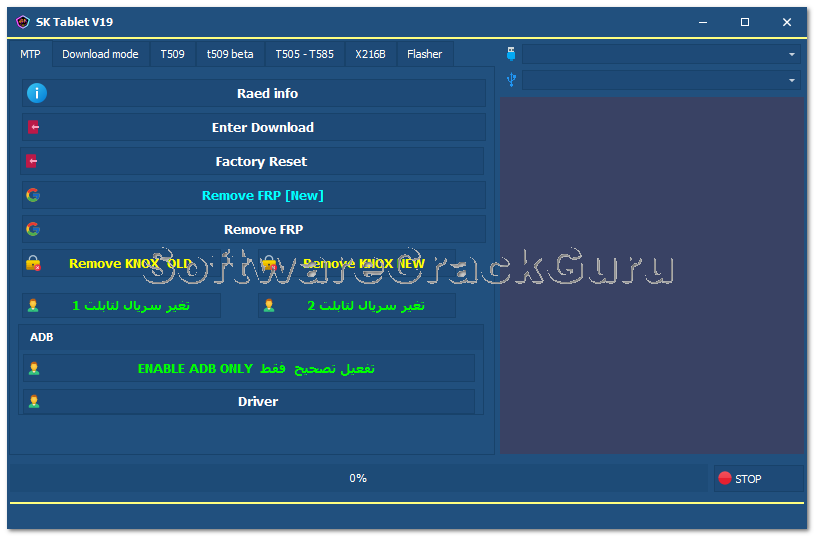
MTP Mode Functions
- ✅ Read Info
- ✅ Enter Download Mode
- ✅ Factory Reset
- ✅ Remove FRP (New Method)
- ✅ Remove FRP (Standard Method)
- ✅ Remove KNOX (Old)
- ✅ Remove KNOX (New)
- ✅ Change Serial Number – Method 1
- ✅ Change Serial Number – Method 2
- ✅ Enable ADB Only
- ✅ Driver Installation
Download Mode Functions
- ✅ Read Info
- ✅ Fix Softbrick
T509 & T509 Beta Tab Functions
- ✅ Convert to BROM (New)
- ✅ Fix BROM + Handshake
- ✅ Format T509 (All / New)
- ✅ Flash Dump (New)
- ✅ Remove MDM
T505 & T585 Tab Functions
- ✅ Format T505
- ✅ Format T585
- ✅ Remove MDM
X216B Tab Functions (Galaxy Tab A9+)
- ✅ Enter Download Mode
- ✅ Format X216B (A9+)
- ✅ Alliance Shield
- ✅ Format + FRP Remove (All EDL)
- ✅ Format + Remove MDM (EDL)
- ✅ Fix A9+ X216B EDL
Flasher Functions
- ✅ Firmware Flashing
- ✅ Partition Selection
- ✅ Region Selection
- ✅ Reboot After Flash
- ✅ Repartition
- ✅ Update Boot
- ✅ Reset EFS
Screenshots
File Information
| Field | Details |
|---|---|
| File Name | SK_Tablet_Free_Setup.rar |
| Version | V19 (Latest – June 2026) |
| Developer | SK Team |
| Trial Period | 10 Days Free (HWID-based activation) |
| Setup Password | gsmyogesh |
| Supported OS | Windows 10 / 11 (64-bit) |
| Offline Support | Yes – works offline after activation |
Download SK Tablet V19
⚠️ Warning: Download and use at your own risk. Always back up your device data before performing any repair or flashing operation. For educational and testing purposes only.
Requirements
- A Windows PC or Laptop
- Windows 10 or Windows 11 (64-bit recommended)
- Samsung USB Drivers installed on your PC
- Active internet connection for first-time activation only
- Disable Antivirus or Windows Defender before running the tool
How To Install and Activate SK Tablet V19
Step 1 – Extract the Setup File
- Find SK_Tablet_Free_Setup.rar and right-click it.
- Select Extract to “SK_Tablet_Free_Setup” using WinRAR or 7-Zip.
Step 2 – Install the Program
- Open the extracted folder.
- Right-click SK_Tablet_Free_Setup.exe and select Run as Administrator.
- Click Next on the setup screen.
Step 3 – Complete Installation
- Enter the installation password: gsmyogesh
- Click Next.
- Enable Create Desktop Icon.
- Click Install and wait for installation to finish.
- Click Finish.
Step 4 – Generate Hardware License
- Run SK Tablet Loader Login Free V19 as Administrator.
- A window will appear showing your Hardware ID.
- Click COPY HARDWARE ID KEY.
- Click GET FREE ACTIVATION KEY — the activation page will open automatically.
Step 5 – Generate Activation Key
- On the activation page, scroll to Generate 10 Days Free Activation Key.
- Paste your Hardware ID and click GENERATE KEY NOW.
- Copy the generated activation token.
Step 6 – Activate and Login
- Return to the tool window.
- Paste the activation token into the license field.
- Click REGISTER LICENSE.
- Wait until the status shows ACTIVE (10 DAYS REMAINING).
- Enter any email address in the Account field.
- Paste the license token into the Password field.
- Click LOGIN to open the main dashboard.
⚠️ Important: Disable antivirus before running the loader. The tool works fully offline after the initial activation is complete.
FAQ
What is SK Tablet V19?
SK Tablet V19 is a dedicated Samsung tablet service tool by the SK Team. It supports FRP removal (MTP and EDL), MDM repair, KNOX bypass, serial number change, BROM conversion, firmware flashing, and partition-level operations for specific Samsung tablet models including T505, T509, T585, and X216B (Tab A9+).
Is SK Tablet V19 free?
The tool is originally paid but available with a 10-day free trial through a HWID-based activation loader. After the trial expires, a paid subscription is required to continue using the full tool.
Does the tool work offline?
Yes. Once activated, SK Tablet V19 works completely offline. An internet connection is only required during the first-time login and HWID activation process.
What Samsung tablet models are supported?
The tool specifically supports Galaxy Tab T505, T509, T585, and X216B (Galaxy Tab A9+) with dedicated tab sections. MTP and Download Mode functions apply to a wider range of Samsung tablets.
What is the setup password?
The setup file extraction and installation password is gsmyogesh. Enter this when prompted during installation.
Why does the tool require antivirus to be disabled?
The HWID-based loader and license activation system may trigger false positive detections in Windows Defender or third-party antivirus programs. Temporarily disabling antivirus during installation and activation prevents these interruptions.
More Tools ⇒