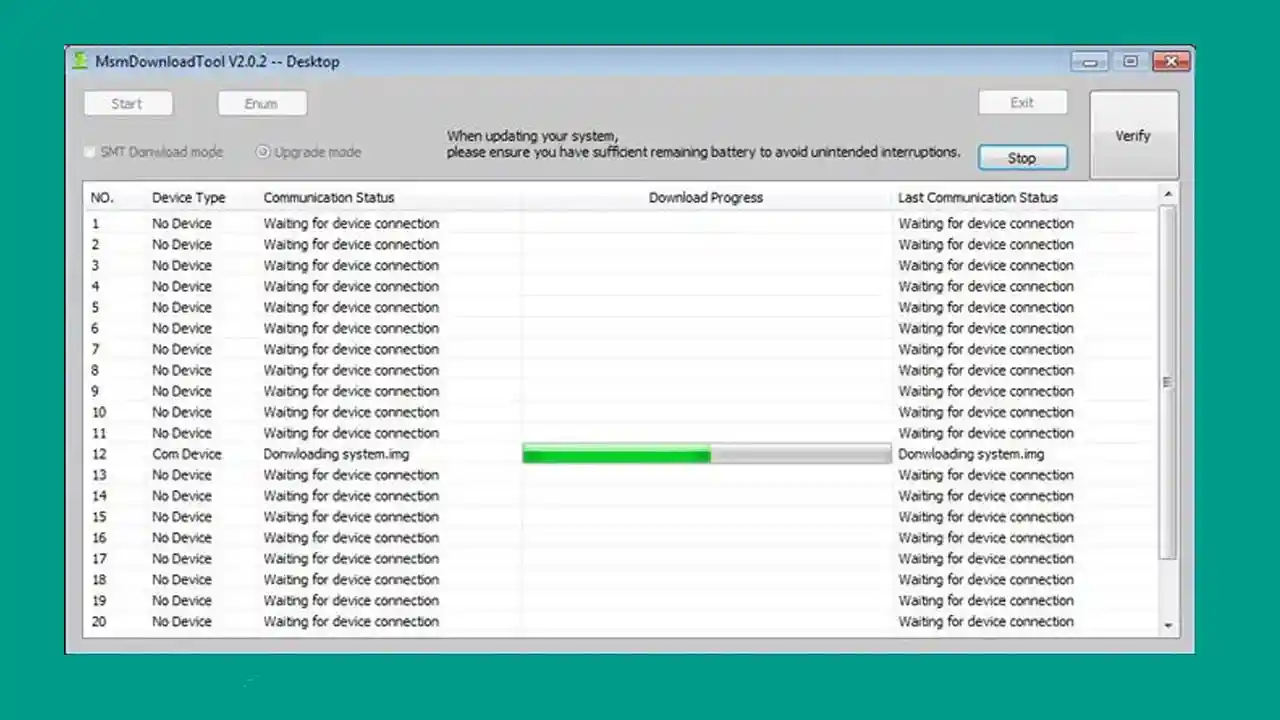
MSM Download Tool is a dedicated flashing utility built specifically for Oppo smartphones, tablets, and feature phones. If your Oppo device is stuck in a boot loop, hard bricked, or locked with a forgotten pattern, this tool gives you a direct way to fix it from your Windows PC without visiting a service center.
The tool lets you flash stock firmware, remove screen and pattern locks, and even upgrade or downgrade the software on your Oppo device. It comes with a clean and simple interface, so even someone with basic technical knowledge can use it without much confusion. All versions of the MSM Download Tool are available here for free download.
What Is MSM Download Tool?
MSM Download Tool is a free Windows-based utility developed for Oppo devices. It connects to your Oppo phone in a special mode and allows you to perform firmware-level operations that are not possible through normal Android settings or recovery mode.
Oppo, Realme, OnePlus, and Vivo all belong to the same parent company — BBK Electronics. However, each brand uses its own version of the download tool. The MSM Download Tool covered here is specifically for Oppo phones. For OnePlus, a separate modded version of the MSM tool exists that works without additional license setup.
The tool requires valid login credentials to operate. It is free to use once you have an authorized account. It is compatible with all major versions of Windows — from XP all the way up to Windows 11.
Features of MSM Download Tool
Flash Stock Firmware — Load and flash the official stock ROM onto any supported Oppo smartphone, tablet, or feature phone. This fixes boot loops, dead phones, and software corruption issues.
Remove Pattern Lock and Screen Lock — If you have forgotten the lock screen password or pattern on your Oppo device, this tool can wipe it cleanly without losing everything through a full wipe.
Upgrade and Downgrade Software — You can update your Oppo phone to the latest available firmware version. If a new update causes bugs or instability, you can also use the tool to roll back to an older stable version.
Manual OTA Installation — When an OTA update is not available over the air for your region or model, MSM Download Tool lets you install the OTA package manually on your device.
Simple User Interface — The tool comes with a straightforward UI that does not require advanced technical knowledge. Beginners can follow the on-screen steps without confusion.
Wide Device Support — Covers Oppo smartphones, tablets, and feature phones including older models like Oppo A3s, A37, A57, and A71, as well as many newer Oppo devices.
Supported Devices
MSM Download Tool supports a wide range of Oppo phones, tablets, and feature phones. Some of the commonly used models include:
- Oppo A3s
- Oppo A37
- Oppo A57
- Oppo A71
- Other Oppo smartphones, tablets, and feature phones
File Information & Download Links
MSM Download Tool v3.0
| Field | Details |
|---|---|
| File Name | MSM_Download_Tool_v3.0 |
| File Size | 8.32 MB |
| File Type | RAR |
| Download Medium | Mediafire |
Download MSM Download Tool v3.0
MSM Download Tool v4.0.58
| Field | Details |
|---|---|
| File Name | MSMDownloadTool_v4.0.58 |
| File Size | 2.55 MB |
| File Type | RAR |
| Download Medium | Mediafire |
Download MSM Download Tool v4.0.58
Requirements
- A Windows PC or Laptop
- Windows XP / 7 / 8 / 8.1 / 10 / 11 (all versions supported)
- WinRAR or 7-Zip to extract the downloaded file
- Correct USB drivers installed for your Oppo device
- Valid MSM Download Tool login credentials
- Stock firmware for your specific Oppo model
How To Install MSM Download Tool
Before you can use the tool to flash firmware, you need to set up the license properly using the Oppo All Tool package. Follow these steps:
- Download the Oppo All Tool RAR file and extract it on your computer.
- Open the extracted folder and install PDANet on your PC.
- After PDANet installs successfully, run the CodeMeterRuntime.exe installer.
- Once installed, open CodeMeter Control Center on your computer.
- Click on File → Import License and load the file named OPPOMsmDownloadToolNoneLic_2001.WibuCmRaU from the extracted folder.
- In the CodeMeter Control Center, check the Status section — it should now show License Activated.
- That’s it. Your system is now ready to run the MSM Download Tool and flash Oppo firmware.
⚠️ Important: Always run all setup files as Administrator to avoid permission errors during installation.
How To Flash Oppo Firmware Using MSM Download Tool
- Download and extract the MSM Download Tool on your PC. Also download the correct stock firmware for your specific Oppo model.
- Go to the extracted folder and run MsmDownloadTool_V3.0.exe as Administrator.
- Inside the tool, load your Oppo stock ROM file.
- Enable USB Debugging on your phone, then turn the phone off completely.
- Press and hold the Volume Up button on your phone and connect it to the PC via USB cable.
- The tool will automatically detect your device. Once detected, click Start.
- The flashing process will begin — you can watch the progress bar in the tool.
- After flashing completes successfully, restart your phone and set it up normally.
⚠️ Note: Make sure you download the exact stock ROM for your Oppo model and region. Using the wrong firmware can cause additional issues.
FAQ
What is MSM Download Tool used for?
MSM Download Tool is used to flash stock firmware on Oppo smartphones, tablets, and feature phones. It also helps remove screen and pattern locks, and allows you to manually upgrade or downgrade the software on your Oppo device.
Is MSM Download Tool free?
Yes, the tool itself is free. However, it requires valid login credentials to use. The Oppo All Tool package includes the license files needed to activate it on your Windows PC.
Which Windows versions does MSM Download Tool support?
The tool is compatible with Windows XP, 7, 8, 8.1, 10, and 11 — covering all major Windows versions.
Can I use MSM Download Tool on OnePlus phones?
The version covered here is specifically for Oppo devices. For OnePlus phones, there is a separate modded version of the MSM Download Tool that works without extra license configuration.
Can MSM Download Tool fix a hard bricked Oppo phone?
Yes. If your Oppo phone is completely unresponsive, stuck on the boot screen, or hard bricked, flashing the stock firmware through MSM Download Tool is one of the most reliable ways to bring it back without visiting a service center.
Do I need to install drivers before using the tool?
Yes. Make sure the correct USB drivers for your Oppo device are installed on your PC before connecting the phone. Without proper drivers, the tool will not detect your device.
More Tools ⇒