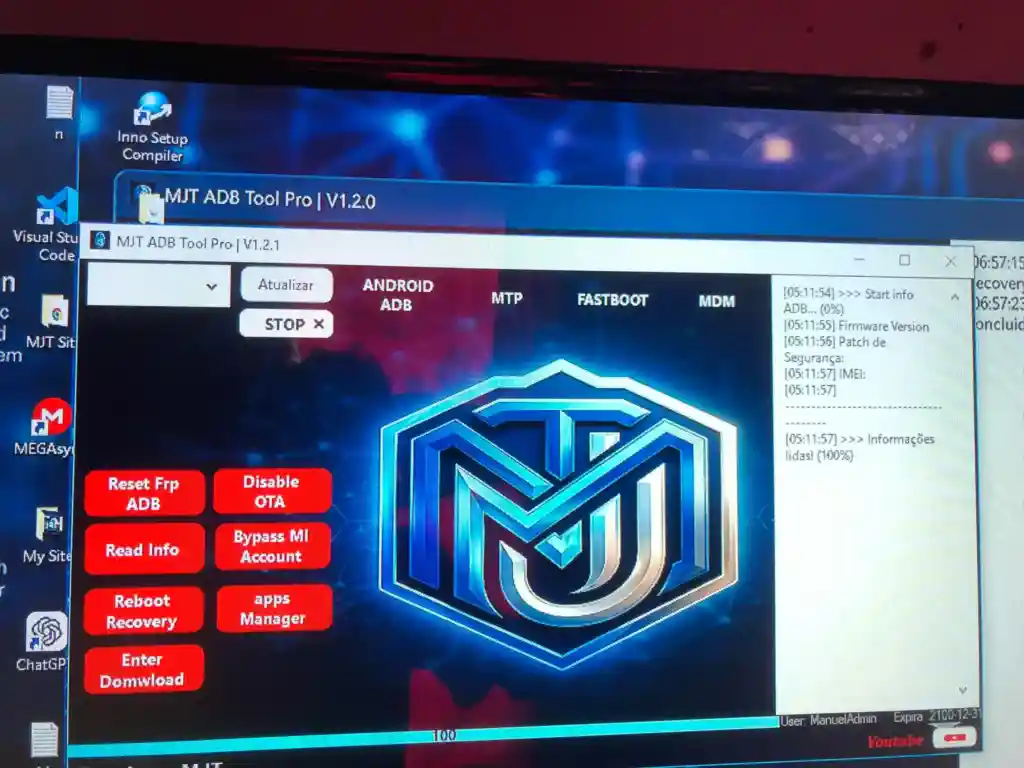
MJT ADB Tool Pro V1.2.1 is a free Android servicing tool designed to help mobile technicians fix common Android problems quickly. It covers a wide range of issues including FRP lock, MDM lock, Samsung KG lock, boot problems, and ADB errors — all from a simple and clean Windows interface. The tool has been personally tested on multiple devices and works smoothly for everyday Android service work. New users get a 30-day free active login included automatically after setup — no activation code needed.
MJT ADB Tool Pro Features
- ✅ Read Device Information
- ✅ FRP Reset via ADB
- ✅ MTP FRP Remove Support
- ✅ MDM Remove Options
- ✅ Samsung KG Support
- ✅ Bypass MI Account
- ✅ Disable OTA Updates
- ✅ Reboot to Recovery Mode
- ✅ Clear Apps Quickly
- ✅ Unlock Network Options
- ✅ Fastboot Tools Included
- ✅ Live Screen Function
- ✅ Install Test DPC
- ✅ Nova Launcher Install Option
- ✅ MTK META Section Support
- ✅ Simple and Clean Interface
Screenshots
File Information
| Field | Details |
|---|---|
| File Name | MJT ADB Tool Pro V1.2.1 |
| Version | V1.2.1 |
| Trial Period | 30 Days Free |
| Setup Password | MJT |
| Login Username | FreeUser30Days |
| Login Password | freeuser |
Download MJT ADB Tool Pro V1.2.1
⚠️ Warning: Download and use at your own risk. Always back up your device data before performing any repair operation.
Requirements
- A Windows PC or Laptop
- Windows 10 or Windows 11 (64-bit recommended)
- ADB & USB Drivers installed on your PC
- Disable Antivirus or Windows Defender before running the tool
- USB Debugging enabled on the Android device
How To Install and Use MJT ADB Tool Pro V1.2.1
- Download the file from the link above.
- Extract the setup using WinRAR or 7-Zip (password: MJT).
- Run the installer as Administrator (right-click → Run as Admin).
- Complete the installation following the on-screen instructions.
- Open the tool — it comes with a 30-day free login pre-activated.
- If prompted, enter the login details — Username: FreeUser30Days / Password: freeuser.
- Connect your Android device via USB with USB Debugging enabled.
- Select the required function and follow the on-screen steps.
⚠️ Important: Always disable your antivirus before running the tool to avoid false detection and blocked operations.
FAQ
What is MJT ADB Tool Pro?
MJT ADB Tool Pro is a free Android repair tool for mobile technicians. It supports FRP reset, MDM remove, Samsung KG bypass, MI account bypass, ADB tools, fastboot functions, and more — all in one clean interface.
Is MJT ADB Tool Pro completely free?
The tool comes with a 30-day free trial login automatically after installation. Use the credentials provided (Username: FreeUser30Days / Password: freeuser) to log in and start using it right away.
Does it require USB Debugging to be enabled?
Yes, for ADB-based operations like FRP reset, MI account bypass, and app management, USB Debugging must be enabled on the Android device before connecting.
What is the setup password?
The setup file password is MJT. Use WinRAR or 7-Zip to extract the file with this password before running the installer.
Does the tool support Samsung KG bypass?
Yes, MJT ADB Tool Pro includes Samsung Knox Guard (KG) support alongside MDM remove options for locked Samsung and other Android devices.
Does it support MediaTek devices?
Yes, the tool includes an MTK META section which provides additional functions specifically for MediaTek-based Android devices.
More Tools ⇒