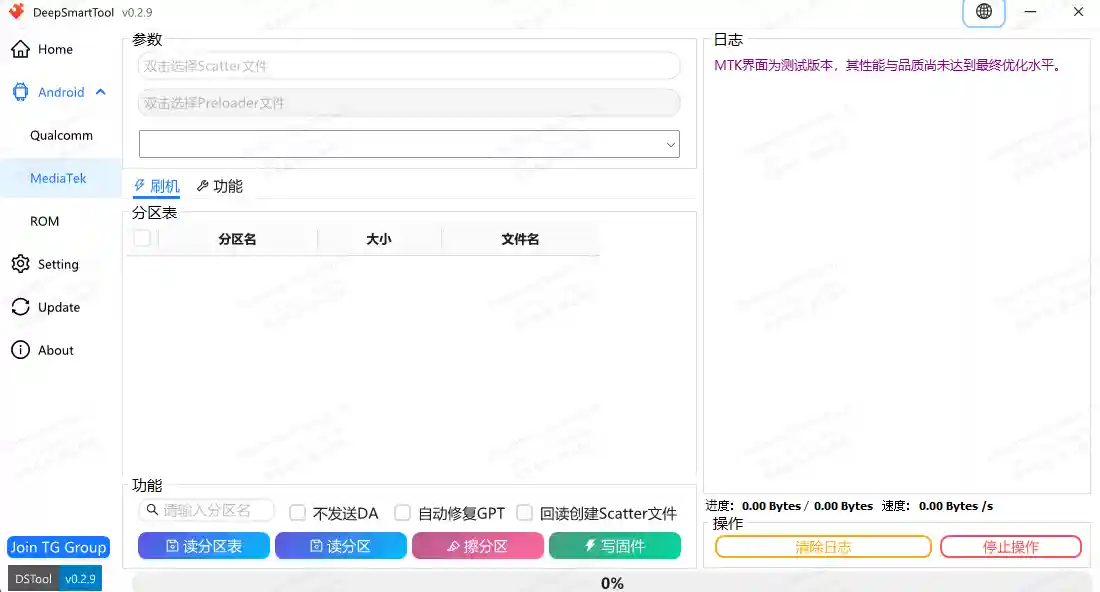
DeepSmartTool is a free professional Android servicing software designed for mobile repair technicians and repair shops. It supports Qualcomm, MediaTek, and Universal Android flashing operations in one clean Windows application. With this tool, you can remove FRP locks, flash firmware, repair partitions, fix boot issues, generate scatter files, and perform many advanced Android service jobs — all from a single easy-to-use interface. The v0.41 English version includes bug fixes and improved stability for daily repair work.
DeepSmartTool Features
- ✅ FRP Reset / Remove
- ✅ Firmware Flashing (Qualcomm & MediaTek)
- ✅ Partition Read / Write / Erase
- ✅ GPT Repair
- ✅ Factory Reset
- ✅ Boot Repair
- ✅ Scatter File Generator
- ✅ Unpack / Package Extraction
- ✅ Fastboot Flash Support
- ✅ ADB & Fastboot Tools Built-in
- ✅ Qualcomm & Android Driver Installer
- ✅ English Version Available
Supported Modules
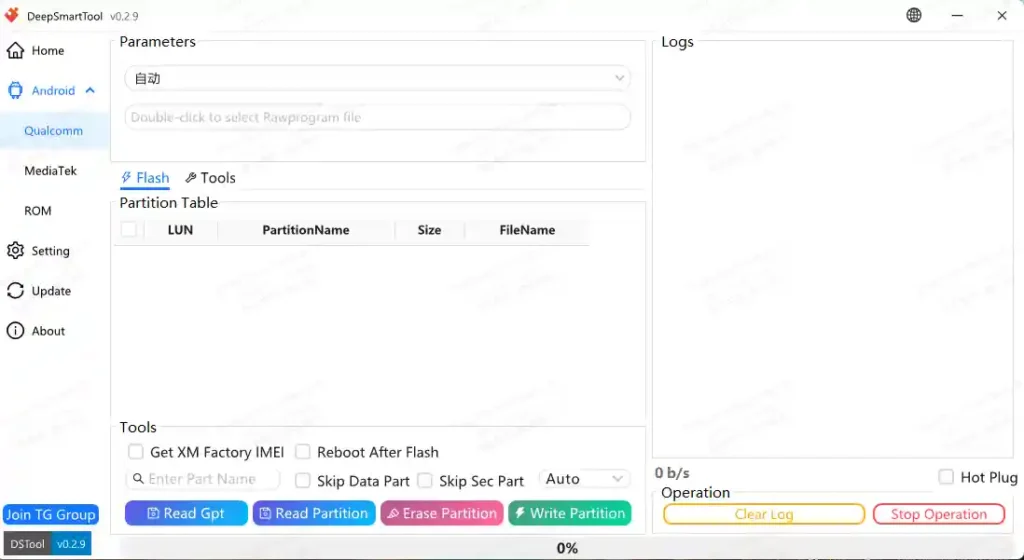
- ✅ Qualcomm Module – FRP, Partition, GPT, Factory Reset, IMEI, Security Backup
- ✅ MediaTek Module – Flash, Partition, Scatter File, GPT
- ✅ Android Flash Module – ADB, Fastboot, Recovery Flash (Xiaomi)
- ✅ Unpack Module – Package Analysis, Partition Read, Firmware Extraction
- ✅ Settings Module – Custom Partition, Readback Folder, Path Configuration
Changelogs
v0.41 – Fixed several known bugs and stability issues
v0.40 – Added support for more models, improved Super Partition handling,
        fixed multiple flashing bugs
v0.36 – Public release optimization update
v0.35 – General bug fixes
v0.34 – Improved OCDT generation and fixed known issues
v0.33 – Better app compatibility improvements
v0.32 – Fixed multiple bugs and improved app stability
v0.31 – UI optimization and function enhancements
v0.30 – Major update: new backup, partition, GPT, scatter and packaging support
v0.29 – Better DevOps display and service improvements
v0.28 – Improved image creation and package processing
v0.27 – Stability update
v0.26 – Added many brand/platform support improvements
v0.23 – Better UI prompts and bug fixes
v0.22 – Added Vivo/MTK improvements and logic fixes
v0.19 – Fixed update and startup problems
v0.18 – Improved digest and encryption processing
v0.17 – General fixes
v0.16 – Public bug fix release
v0.15 – Initial internal release improvements
Screenshots
Download DeepSmartTool v0.41
You can download the latest English version of DeepSmartTool below:
Download DeepSmartTool v0.41 – English Version
⚠️ Warning: Download and use at your own risk. Always back up your device data before performing any repair operations.
Requirements
- A Windows PC or Laptop
- Windows 10 or Windows 11 (64-bit recommended)
- Disable Antivirus or Windows Defender before running the tool
- Run the tool with administrator privileges
- Qualcomm or Android USB drivers installed for your device
How To Install and Use DeepSmartTool
- Download the DeepSmartTool zip file from the link above.
- Extract the zip package to a folder on your PC.
- Disable your antivirus before extracting or running the tool.
- Right-click the main application and select Run as Administrator.
- Install Qualcomm or Android drivers from the Home tab if needed.
- Select your chip platform — Qualcomm, MediaTek, or Android Flash.
- Connect your device via USB in the correct mode (EDL, BROM, Fastboot, or ADB).
- Choose the function you need and follow the on-screen instructions.
⚠️ Important: Always run the tool as administrator and disable your antivirus first, or some functions may not work correctly.
FAQ
What is DeepSmartTool?
DeepSmartTool is a free Windows-based Android repair software that supports Qualcomm, MediaTek, and general Android flashing. It can remove FRP locks, flash firmware, repair partitions, fix GPT, and perform many advanced service functions in one place.
Is DeepSmartTool free to use?
Yes, v0.41 is a public free release and can be downloaded using the link provided above.
Which chip platforms does DeepSmartTool support?
The tool supports Qualcomm (EDL mode), MediaTek (BROM/Download mode), and general Android devices via ADB and Fastboot.
Which operating systems does DeepSmartTool support?
The tool is compatible with Windows 10 and Windows 11 (64-bit). Make sure to disable your antivirus before running the tool to avoid false detection.
Why won’t the tool open or work correctly?
Make sure you are running the tool as administrator and that your antivirus or Windows Defender is fully disabled. Also ensure the correct USB drivers are installed for your device.
Does DeepSmartTool support Xiaomi / Redmi devices?
Yes, the Android Flash module includes Fastboot flash support and Recovery Package flashing specifically for Xiaomi and Redmi devices.
More Tools ⇒