GSM Unlocker Pro is a free mobile servicing tool developed by the Extra Tool Team for phone repair and unlocking work. It supports Samsung, MediaTek, LG, Vivo, OnePlus, Motorola, and Realme devices and covers a wide range of functions including FRP removal, IMEI repair, firmware flashing, security data management, bootloader unlock/relock, and VoLTE/network configuration. Version 1.0.2 is the latest 2026 release and is available as a free download with trial login credentials.
GSM Unlocker Pro Features
Main Functions
- ✅ Read Info
- ✅ Direct Unlock
- ✅ Write Cert / Read Cert
- ✅ Change CSC
MediaTek (MTK) Functions
- ✅ Flash Modem
- ✅ Unlock Bootloader / Relock Bootloader
- ✅ Wipe FRP All MTK
- ✅ Backup Security / Restore Security
- ✅ Remove Mi Account
- ✅ Remove Oppo ID
- ✅ Wipe Data Safe – MasterClear-FD / MasterClear-WD / Reset Settings
- ✅ Wipe Data Safe – Huawei
- ✅ Wipe Data Safe – Keep Media (OPPO / REALME)
- ✅ Wipe Data Safe – Keep Media (VIVO)
- ✅ Wipe Data (Ext4)
Samsung MTK Functions
- ✅ Wipe FRP Samsung DM Mode
- ✅ Set KG Completed / Set KG Prenormal / Set KG Checking
- ✅ Force Enter BROM Samsung
- ✅ Exit BROM (Repair Boot)
- ✅ Exit Download Mode Samsung
- ✅ Exit Download Mode Samsung By PIT File
- ✅ Read RPMB / Write RPMB / Erase RPMB
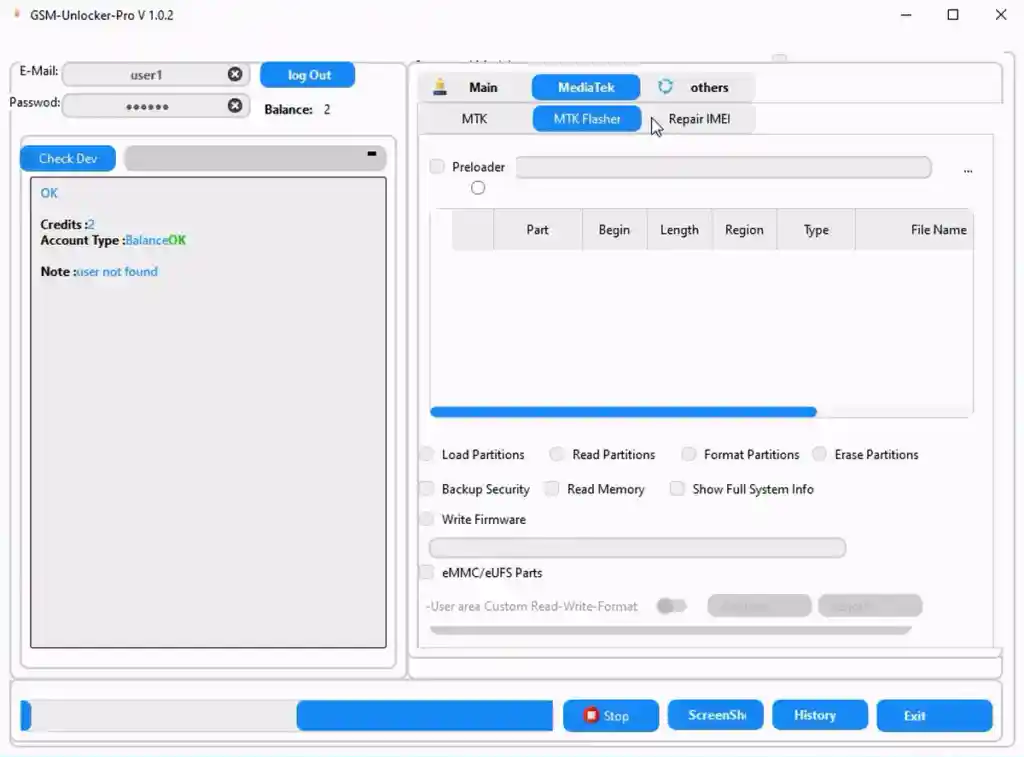
MTK Flasher Functions
- ✅ Load / Read / Format / Erase Partitions
- ✅ Backup Security
- ✅ Read Memory
- ✅ Show Full System Info
- ✅ Write Firmware
- ✅ eMMC / eUFS Parts
- ✅ Custom Read / Write / Format User Area
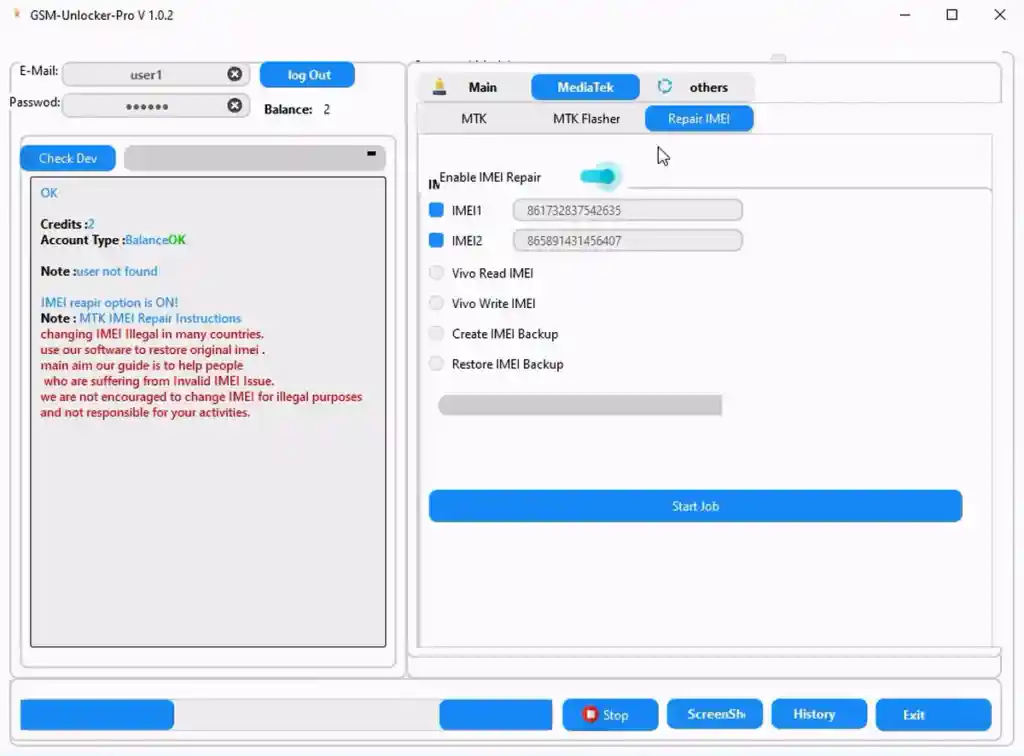
IMEI Repair Functions
- ✅ Enable IMEI Repair
- ✅ Repair IMEI 1 / Repair IMEI 2
- ✅ Vivo Read IMEI / Vivo Write IMEI
- ✅ Create IMEI Backup / Restore IMEI Backup
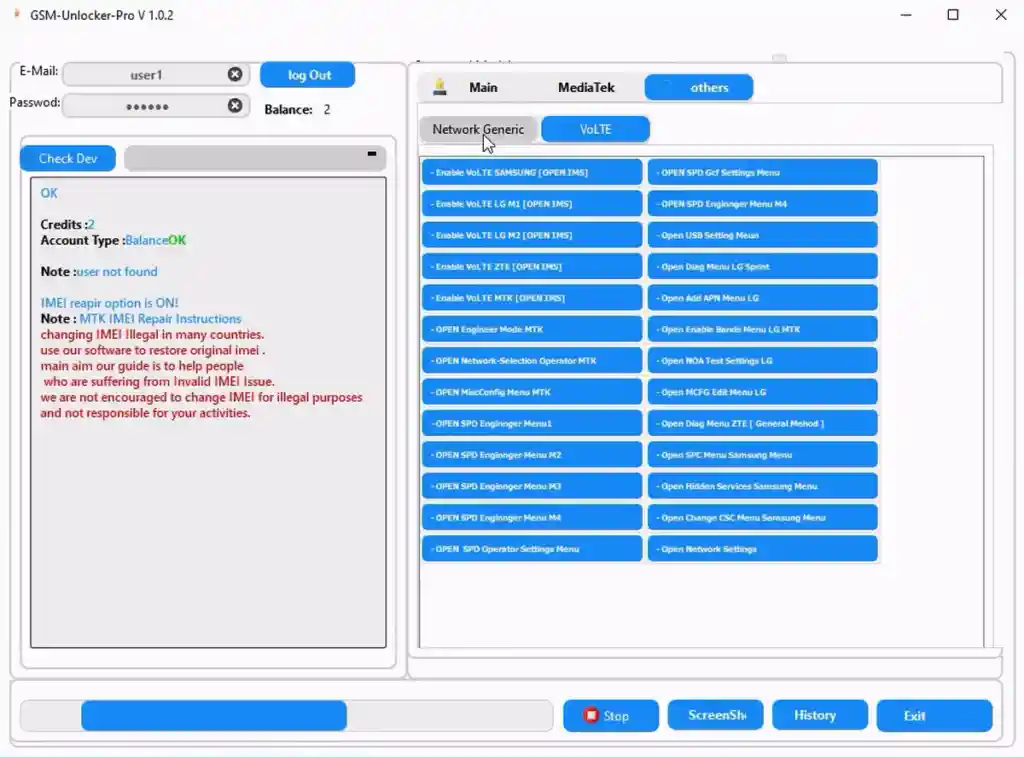
VoLTE / Network Tools
- ✅ Enable VoLTE Samsung / LG IM1 / LG IM2 / ZTE / MTK
- ✅ Open Engineer Mode MTK
- ✅ Open Network Selection Operator MTK
- ✅ Open MiscConfig Menu MTK
- ✅ Open SPD Engineer Menu (M1 / M2 / M3 / M4 / M44)
- ✅ Open SPD Operator Settings / GCF Settings Menu
- ✅ Open USB Setting Menu
- ✅ Open Diag Menu LG Sprint / ZTE
- ✅ Open Add APN Menu LG
- ✅ Open Enable Bands Menu LG MTK
- ✅ Open NOA Test Settings LG / MCFG Edit Menu LG
- ✅ Open SPC Menu Samsung / Hidden Services Samsung
- ✅ Open Change CSC Menu Samsung
- ✅ Open Network Settings
Supported Models
OnePlus – OnePlus 4 Lite, OnePlus N100
Vivo – Vivo 4G LTE
Samsung Galaxy – J3 Orbit, J3 Pro (J3119), A5 (A500), A6, A6+ 2018, A71 5G, A71 5G SC, C7 Pro, S4 Active, S7 Edge, S8, S8+, S9, S9+ 5G, S10, S10+, S10e, S20, S20+ 5G, S20 Ultra 5G, S21 Ultra 5G, Note5, Note8, Note8+ 5G, Note9, Note10, Note10 5G, Note10+, Note20 Ultra 5G, Fold 2, Fold 3 5G, Z Flip, Z Fold 3
LG – K3, G6, G8, V50, Velvet, Wing
Motorola – Moto G Stylus, Moto G Power, Moto G7, Moto G Play
Realme – Realme 5G All LTE
Screenshots
File Information
| Field | Details |
|---|---|
| File Name | GSM_Unlocker_Pro_V1.0.2.7z |
| Version | V1.0.2 (Updated 2026) |
| File Size | 55.8 MB (Extracted: 150 MB) |
| Developer | Extra Tool Team |
| Free or Paid | Free |
| Login Username | user1 |
| Login Password | 123456 |
| File Password |
Download GSM Unlocker Pro V1.0.2
⚠️ Warning: Download and use at your own risk. Always back up your device data before performing any repair or flashing operation.
Requirements
- A Windows PC or Laptop
- Windows 10 or Windows 11 (64-bit recommended)
- WinRAR or 7-Zip to extract the file (password: laroussigsm.net)
- Proper USB drivers for your device brand (included in tool — one-click install)
- Disable Antivirus or Windows Defender before running the tool
How To Install and Use GSM Unlocker Pro V1.0.2
- Download the 7z file from any link above and extract it to your C: drive (important — do not extract to the Desktop or other folders).
- Disable your antivirus before running the installation.
- Open the extracted folder and install the setup file following the on-screen instructions.
- Run “GSM-Unlocker-Pro v1.0.2.exe” from your Desktop as Administrator (right-click → Run as Admin).
- Enter the login details — Username: user1 / Password: 123456 — and click Login.
- Install all drivers from inside the tool (one-click install — skip if already installed).
- Connect your phone via USB, select the required function, and enjoy!
⚠️ Backup Notice: Before using any flash or repair function, always take a full backup of your personal data. Flashing firmware or performing security operations may brick the device if done incorrectly.
FAQ
What is GSM Unlocker Pro?
GSM Unlocker Pro is a free Android repair and unlocking tool by the Extra Tool Team. It supports Samsung, MediaTek, LG, Vivo, OnePlus, Motorola, and Realme devices with functions like FRP removal, IMEI repair, firmware flashing, bootloader unlock/relock, security backup/restore, and VoLTE/network configuration.
Is GSM Unlocker Pro free?
Yes, it is completely free. Use the provided credentials (Username: user1 / Password: 123456) to log in — no dongle or paid activation required.
Where should I extract the tool?
Always extract to the C: drive (e.g., C:\GSM_Unlocker_Pro). Extracting to other locations like the Desktop may cause errors during installation.
Do I need to install drivers separately?
No. USB drivers are included inside the tool. On first launch, click the one-click driver install option. Skip this step if drivers are already installed on your PC.
Which chipsets does GSM Unlocker Pro support?
The tool primarily supports MediaTek (MTK) chipsets for flashing, FRP, and IMEI repair, with Samsung-specific MTK functions including BROM, RPMB, and KG operations.
Does the tool support VoLTE enabling?
Yes. GSM Unlocker Pro includes VoLTE enabling for Samsung, LG (IM1/IM2), ZTE, and MTK devices, along with a full suite of network and engineer mode tools for LG, SPD, and Samsung.
More Tools ⇒