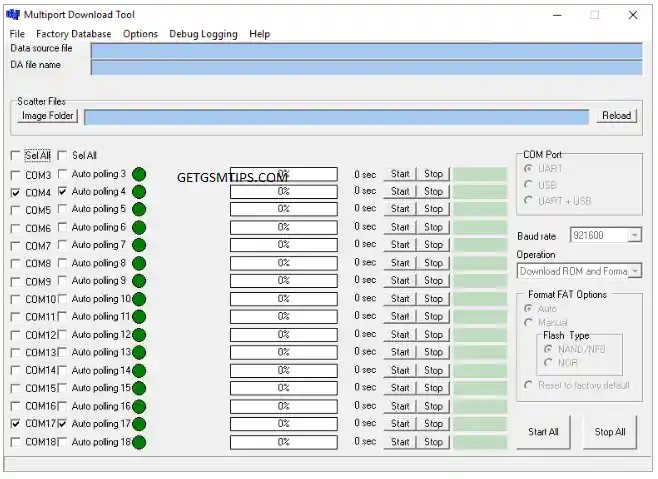
SP MDT v5.1340 (also known as the Multi Port Download Tool) is a free Windows-based flashing utility designed specifically for MediaTek (MTK) powered Android smartphones and tablets. It supports multi-port flashing, meaning you can flash multiple devices simultaneously — making it a popular choice for repair shops and technicians.
Whether you need to install stock firmware, upgrade or downgrade your Android version, flash a custom recovery, or remove FRP and screen locks, SP MDT is a reliable and lightweight solution for all MTK scatter-based ROM flashing tasks.
Key Features
- ✅ Flash Scatter-based Stock ROMs on MTK Android devices
- ✅ Support for multi-port flashing — flash multiple devices at once
- ✅ Upgrade or downgrade Android firmware versions
- ✅ Flash custom recovery files (e.g. TWRP)
- ✅ Bypass FRP lock and remove screen locks
- ✅ Compatible with a wide range of MTK-powered smartphones and tablets
- ✅ Free to download — no password required
- ✅ Lightweight and easy to use on any Windows PC or laptop
Tool Details
| Property | Details |
|---|---|
| Tool Name | SP MDT Multi Port Download Tool |
| Version | v5.1340 |
| Compatible OS | Windows XP / 7 / 10 / 11 |
| Supported Chipset | MediaTek (MTK) |
| ROM Format | Scatter-based firmware |
| File Password | No password required |
| License | Free |
Requirements Before You Begin
Make sure you have the following ready before using SP MDT:
- ✅ Windows PC or Laptop
- ✅ Good quality USB cable (original or braided recommended)
- ✅ MTK USB Driver installed on your PC
- ✅ Correct Scatter file for your device’s firmware
- ✅ Stock firmware package for your target device
- ✅ Full backup of all personal data before flashing
Download SP MDT v5.1340
| Tool Version | File Password | Download |
|---|---|---|
| SP MDT v5.1340 | No Password | Direct Download |
💡 Always use the latest version of SP MDT for the best compatibility and stability with newer MTK devices.
How to Install and Use SP MDT v5.1340
Follow these steps carefully to flash your MTK device using SP MDT:
Step 1 – Download the SP MDT v5.1340 ZIP file from the link above and extract it to a folder on your PC using WinRAR or 7-Zip.
Step 2 – Open the extracted folder and run the Multi Port Download Tool (MDT) application.
Step 3 – Once the tool launches, click on Settings, then click Load.
Step 4 – Navigate to your extracted firmware folder, select the correct Scatter.txt file for your device, and click Confirm.
Step 5 – All firmware partitions will populate automatically in the tool.
Step 6 – Click the Play button to begin the flashing process.
Step 7 – Now power off your device completely, then connect it to the PC via USB while holding both Volume keys (Up + Down) simultaneously. This puts the device into Flash Mode.
Step 8 – SP MDT will automatically detect your device and begin flashing. Do not disconnect the device during the process.
Step 9 – Wait for the flash to complete. A success notification will appear when done and your device will reboot automatically.
Tips for Best Results
- Always install the MTK USB Driver before connecting your device — SP MDT may not detect the device otherwise
- Use the original USB cable where possible; cheap cables often cause connection drops mid-flash
- If the tool doesn’t detect your device, try a different USB port (prefer USB 2.0 over USB 3.0 for MTK devices)
- Make sure you have the correct scatter file that matches your exact firmware build — using a mismatched scatter file can brick the device
Related Firmware & Tools
Looking for more MTK flash tools and firmware downloads? Check out these resources on GetGsmTips:
- 🔗 DeepSmartTool v0.41 – Free MTK Firmware Flash & Repair Software
- 🔗 KS Tool 4.6 – Free FRP & Flash Tool for Android Devices
- 🔗 ColokTool Pro – Free All-in-One Android Repair Tool
- 🔗 iFrpfile All In One Tool – Free iCloud & FRP Bypass
- 🔗 VG Open Menu Tool V3.0 – Free iCloud Activation Lock Removal
💡 Pro Tip: Bookmark GetGsmTips.com for the latest MTK flash tools, Samsung and Huawei firmware downloads, and step-by-step mobile repair guides — updated regularly.