Android Multi Tool (AMT Tool) v1.3.5.7 is the latest 2026 release of the popular all-in-one Android repair platform developed by Goutam Great. It supports MediaTek, Qualcomm Snapdragon, Unisoc (SPD), and Samsung Exynos chipsets and covers essential repair functions including FRP bypass, firmware flashing, screen lock removal, IMEI repair, bootloader management, RPMB read/write, and advanced mode switching — all from a single Windows interface. Unlike basic one-click tools, AMT communicates with devices through multiple low-level connection modes including ADB, Fastboot, EDL, BROM, Download Mode, Test Point, and Diag Mode. This version brings expanded brand support, improved server stability, and important bug fixes over v1.3.5.4.
Android Multi Tool Features
- ✅ FRP Bypass – Samsung, Xiaomi, Vivo, Oppo, Realme, Motorola and more
- ✅ Firmware Flashing – MTK, Qualcomm, and Samsung devices
- ✅ Screen Lock Removal – PIN / Pattern / Password / Fingerprint
- ✅ IMEI Repair – Read, Backup, and Repair IMEI on supported devices
- ✅ Bootloader Unlock / Relock (with Anti-Relock support)
- ✅ MTK Auth Bypass (Server-based, no extra dongle needed)
- ✅ Qualcomm Auth Bypass (Server-based)
- ✅ RPMB Read / Write (eMMC / UFS storage repair)
- ✅ Mode Switching – Reboot to Fastboot / EDL / BROM / Recovery / Download / Diag
- ✅ Read Device Info
- ✅ Dedicated modules for MTK, Qualcomm, Unisoc, and Samsung Exynos
Supported Connection Modes
| Mode | Used For |
|---|---|
| ADB Mode | FRP reset, app management, device info reading |
| Fastboot Mode | Bootloader unlock, partition flashing |
| EDL Mode (9008) | Deep Qualcomm flashing and recovery |
| BROM / Preloader | MediaTek deep flash and bricked phone recovery |
| Download Mode | Samsung firmware flashing |
| Test Point | MTK models where standard modes are inaccessible |
| Diag Mode | IMEI repair and advanced diagnostics |
Supported Brands
AMT Tool v1.3.5.7 supports the following brands across all major chipset platforms:
- ✅ Samsung, Xiaomi, Redmi, POCO
- ✅ Vivo, Oppo, Realme, OnePlus
- ✅ Motorola, Infinix, Tecno, Itel
- ✅ Nokia, Huawei, Honor, Lenovo
- ✅ Nothing – CMF Phone 1, CMF Phone 2 Pro, Phone 1, Phone 2, Phone 3
Full supported models list available at androidmultitool.com/supported_models
Screenshots
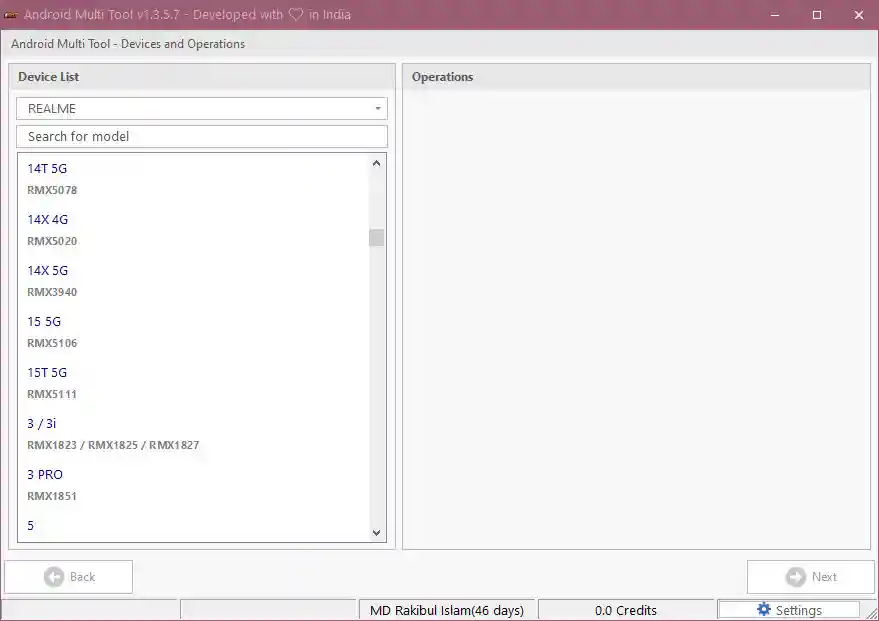
File Information
| Field | Details |
|---|---|
| Tool Name | Android Multi Tool (AMT Tool) |
| Version | v1.3.5.7 (Latest – May 2026) |
| Developer | Goutam Great |
| File Name | AMT_Tool_Latest_Setup.zip |
| File Size | 50 MB |
| Supported OS | Windows 7 / 8 / 10 / 11 (32-bit & 64-bit) |
| Supported Chipsets | MediaTek, Qualcomm, Unisoc (SPD), Exynos |
| License | Paid (Credit-Based) |
Download Android Multi Tool v1.3.5.7
🔐 License: Paid — Purchase credits from an official reseller at androidmultitool.com
⚠️ Warning: Download and use at your own risk. Always back up your device data before performing any repair or flashing operation. Avoid cracked versions — outdated tools may damage Android 14/15 devices.
Requirements
- A Windows PC (Windows 7 / 8 / 10 / 11 — 32-bit or 64-bit)
- Registered AMT account with login credentials
- Active credit balance or subscription
- Correct USB drivers (MTK, Qualcomm, Samsung, Oppo)
- Original or high-quality USB data cable
- Minimum 30% device battery before starting
- Stable internet connection for server-based authorization
How To Install and Use Android Multi Tool v1.3.5.7
- Download the zip file from the link above and extract it to your PC.
- Install the correct USB drivers for your device brand before connecting.
- Run AMT_Tool_Latest_Setup.exe as Administrator (right-click → Run as Admin).
- Log in using your registered AMT account credentials.
- Identify your device — check the brand, model, and chipset.
- Select the required brand module and function (FRP, Flash, Reset, IMEI, etc.).
- Put your device into the correct mode — ADB, EDL, BROM, or Download Mode as required.
- Connect via USB, click Start, and wait for the operation to complete.
- Reboot the device and verify the process was successful.
⚠️ Important: Check Lost Mode status on Tecno/Infinix devices before using credits. Use correct firmware to avoid device bricking.
FAQ
What is Android Multi Tool (AMT Tool)?
Android Multi Tool is a premium Windows-based Android repair platform for GSM technicians. It supports MTK, Qualcomm, Unisoc, and Exynos chipsets with functions including FRP bypass, firmware flashing, screen lock removal, IMEI repair, bootloader unlock, and RPMB operations — all accessible from a single interface.
Is AMT Tool free?
AMT Tool uses a credit-based licensing system. The software can be downloaded for free, but operations require an active credit balance purchased from an official reseller at androidmultitool.com.
What chipsets does AMT Tool support?
The tool supports MediaTek (BROM/Preloader), Qualcomm Snapdragon (EDL/Diag), Unisoc/SPD, and Samsung Exynos (Download Mode) chipsets across all major Android brands.
What connection modes does it use?
AMT Tool communicates through ADB, Fastboot, EDL (9008), BROM/Preloader, Download Mode, Test Point, and Diag Mode — giving it access to both everyday and deep chipset-level operations.
Why should I avoid cracked versions?
Cracked or outdated versions of AMT Tool may contain incorrect server responses or outdated firmware references that can permanently damage Android 14 or 15 devices. Always use the official download.
What is the difference between v1.3.5.7 and v1.3.5.4?
Version 1.3.5.7 brings expanded brand support, improved server stability, and important bug fixes over v1.3.5.4, making repair operations faster and more reliable overall.
More Tools ⇒